SolveigMM Video Splitter Version History
2.2.1005.17, Update, 2010-05-17- Feature:
- - Installer updated to be more compatible with Windows Vista and Windows 7.
2.2.1005.4, Update, 2010-05-04
- Feature:
- - Improved MPEG-2 joining speed.
- Video preview aspect ratio stays always the same.(Video in prewiew window is not stretched as was earlier)
- - Improved MPEG-2 joining speed.
2.2.1004.20, Update, 2010-04-20
- Feature:
- - Merging in file by file mode of the files – AVI, WMV/ASF, WMA, MP3, MPEG-2 PS/TS/VES, MPEG-1 SS/VES
- Ability to choose MPEG-2 TS program for playback
- Audio language is should for MPEG-2 TS streams in the Splitter Control menu
- Installed Splitter can now properly work with restricted Windows accounts – power user, user etc. Before, it required only administrator account to operate
- All the SolveigMM Splitter binaries and installation signed with Comodo certificate
- - Merging in file by file mode of the files – AVI, WMV/ASF, WMA, MP3, MPEG-2 PS/TS/VES, MPEG-1 SS/VES
- Fix:
- - Optimized joining process, not it is faster
- Fixed memory leaks arisen during join
- Fixed registration problem that required administrator privileges in Windows 7 and Vista
- AVI opening hanging files fixed by adding to black list FFDshow Audio Processor that caused such problem
- Improved K-frame and Frame navigation for WMV/ASF files with variable frame rate
- Fixed trim crash if there are set only two markers and they are placed at the same positions
- Many major and minor GUI fixes and improvements
- Repeating joining of same input to same output could cause hanging or slow joining
- Some MPEG-1 files (from Sony photo cam) were rejected to be merged
- Joining progress sometimes jumped during merging
- Project saving (.ssp) did not keep a name of an output file
- MPEG-1 layer 1,2 were not loaded to the Splitter
- Fixed MPEG-2 editing inaccuracy for “Save All Fragments Feature” caused by an index missing. Accuracy of same fragment though Trim button and “Save All Fragments Feature” could mismatch.
- If in batch script contained colon before milliseconds (00:00:50:59) instead of dot (00:00:50.59), batch managed could accept such times in a wrong way
- Slow trimming of WMA files could be experienced sometimes
- Indexation of short MPEG-2 files could hang
- On some WMV/AS files process of saving separate video/audio stream failed
- AAC and ADPCM audio in input AVIs were shown by Splitter as unknown
- Info dialog missed to enumerate some of the filters used by the Splitter
- Navigation though markers using TAB did non refresh a marker time in the according edit box
- Trimming of some WMV files with errors in metadata header failed. Fixed now.
- Fixed help doc hotkeys. Now “Jump to movie end” – End, “Jump to movie start” - Home
- - Optimized joining process, not it is faster
- Change:
- - Minor components updates
- - Open file dialog now remains opened during adding files for further joining
- Output file name for joining files now is offered as name of first file + _joined
- Improved navigations for audio files, enabled next/previous K-Frame button (jump to 1 sec), mouse wheel (jump to 1 sec) and next / previous frame (jump to 25 millisecond)
- Item: Open input/output file in the Splitter added to context menu of joiner manager
- Joining project extension is changed to jxtl. Now Splitter Project has - .ssp, Batch Project has .xtl, and Joining Project has .jxtl.
- Now if the default indexation folder (that is same as an input MPEG files) is disabled for writing the index is created to the folder - C:\Documents and Settings\_User_\Application Data\Solveig Multimedia\SolveigMM Video Splitter\_Index_\. When the Splitter opens MPEG file it checks now indexes at this folder and near to input file.
- Default index file name now include a whole input file name, with extension, e.g. - 8MBit.MPG.mlmix
2.2.912.18, Update, 2009-12-18
- Change:
- - Minor components updates
2.2.911.12, Update, 2009-11-12
- Fix:
- - Ńrash while trimming some AVI files with AVC/H264 video
- Error "The data is invalid. HRESULT: 0x8007000d" while trimming and joining some AVI files with AAC and AC3 audio to have align blocks in media type.
- Inability to join AVI DV Type-1 files.
- Hotfix: Inability to trim AVI files with VBR audio.
- - Ńrash while trimming some AVI files with AVC/H264 video
2.2.909.30, Update, 2009-09-30
- Fix:
- - crash occurred at the end of AVI files trimming if input AVI file’s MPEG audio bitrates equals to zero, in other words corrupted.
2.2.909.17, Update, 2009-09-17
- Fix:
- - Join manager: fixed "Out of memory" error
- Join manager: fixed random hangs while joining
- - Join manager: fixed "Out of memory" error
2.2.905.18, Update, 2009-05-18
- Fix:
- - MPEG-2 Frame accuracy: If a fragment ended with one of the first open GOP's B-frames, those frames had been dropped
2.2.904.24, Update, 2009-04-24
- Feature:
- - Some changes in join manager interface
- Fix:
- - Some joining problems fixed.
- AVI-DV Type1 joining invalid progress.
- Potential loss of the part of video after trimming AVI and Windows Media files.
- - Some joining problems fixed.
2.2.904.22, Update, 2009-04-22
- Fix:
- - Incorrect output file duration after joining AVI-DV Type1 files
2.2.904.16, Update, 2009-04-16
- Fix:
- - Inability to trim AVI files (Error: trimmer configurations have not been set).
- Inability to start trimming after loading new file.
- - Inability to trim AVI files (Error: trimmer configurations have not been set).
2.2.904.14, Update, 2009-04-14
- Fix:
- - Impossibility to join MPEG1 files
2.2.903.23, Update, 2009-03-23
- Feature:
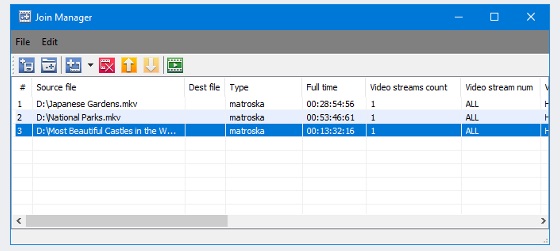
- - Open Folder mode available via Join Manager Toolbar.(small arrow near the + picture).
- Browse For Output request when Joining is completed.
- Ability to hide Joiner progress window.
- Files are sorted before adding into the list.
- - Open Folder mode available via Join Manager Toolbar.(small arrow near the + picture).
2.2.903.12, Update, 2009-03-12
- Fix:
- - Join manager incompatibility with Haali splitter associated with AVI files.
- - Multichannel MPEG-1 files incorrect joining.
- - Incorrect audio timing causing audio artefacts after joining.
- - Join manager crash when adding audio-only AVI files.
- - Synchronization lost after joining AVI with vbr mp3 audio.
- - Crash when saving output file to read-only area (Join manager).
2.2.903.4, Beta, 2009-03-04
- Feature:
- - Added file joiner. Supported formats are AVI, WMA/WMV/ASF, MP3, MPEG-1 video
2.1.901.23, Update, 2009-01-31
- Feature:
- - Added enumeration prefix to output file names. e.g input_0001.avi, input_0002.avi
- - Added "Add Task to Batch" item to Timeline context menu
- - "Save All Segments" feature, that saves all the fragments on timeline to separate files
- Fix:
- - Byte size now is showed in GB/MB/KB format instead of Bytes
- - Eating to big amount of memory and 99% hanging during big MPEG-2 files editing
- - Indexation of big MPEG-2 files sometime ended up with 99% progress hang
- - Crash during some AVIs with PCM audio trimming
- - Hang during attempt to open some other than XTL file as task list file (.xtl)
- - Command line util trimming results were unstable if edit big files > than 10 GB
2.1.901.13, Update, 2009-01-13
- Fix:
- - Crash when trying to edit MPEG2 files via comand line batch utility.
2.1.810.30, Update, 2008-10-30
- Fix:
- - Fixed a crash arisen while trimming some AVI files with MP3 audio
- - Video screen did not redraw while dragging or maximizing the main window
- - Fixed problem - if to open MPEG-2 with LPCM audio and try to edit that, the Splitter generated error - "Connecting additional trimmer pin with Muxer has been filed. hr = 0x80040207"
- - Inaccurate editing of DVD VOB files. End positions of fragments set to be kept in output mismatched with set positions. Up to 10 frames in each fragment could be more than required
- - LPCM audio in MPEG-2 wrong detection. The splitter showed Unknown audio type
- - Fixed navigation problem - when you navigate slider cursor between markers by TAB and then try to seek to one frame left/right, a current marker was navigated instead of a slider cursor
- - Fixed bug - when one tried to open SSP or XTL project with reference to index file(MLMIX) for MPEG-2 files > 4GB, splitter delivered message - "Source file is not supported or damaged"
- - Clip Scr file in SSP or XTL project showed incorrectly (e.g. if it was "C:tempfile.vob" it showed "C:temp.file.vob")
- - If there was turned on - "Obey Sample Times" feature - obey_sample_times="1" flag was written twice to XTL or SSP that caused error in attempt to open such XTL or SSP file
- - Fixed a false alarm of possible File rewriting. If you opened some SSP, and changed an output file name then if it even did not exist the Splitter generated the warning
- - Fixed bug. If to open SSP file with set output file that can't be created and start processing, the Splitter fulfilled task but did not create an output. Now it generates an error
- Change:
- - If opening SSP file the Splitter does not find Clip Scar file (e.g. it was moved to other folder) it asks a user to specify it rather then error deliver
- - Starting, "Time Calculator" now shows the difference between two nearest markers relatively the slide cursor position
- - To improve usability added *.SSP file filter on Open Media File dialog
2.1.808.21, Update, 2008-08-21
- Fix:
- - Fixed a bug with MPEG-2 files aspect ration changes. After MPEG-2 files
- editing aspect ratio could be changed.
- - Fixed a bug with MPEG-2 files aspect ration changes. After MPEG-2 files
2.1.807.01, Update, 2008-07-01
- Fix:
- - Milliseconds and seconds arrows did not operate correctly in timeline edit boxes
- - Black screens after editing MPEG-4 video (AVI,ASF,WMV) e.g. XVID with one visual object sequence per file. Now info added to first output frame.
- - There were thee digits instead of two in milliseconds time fields in timeline edit boxes. now format is HH:SS:MM:MS. MS is two most significant digits of milliseconds
- - Crash upon opening AVI file in the Splitter more than one time in Vista OS.
- - Crash upon opening file project (.ssp)
- Change:
- - For now one more error of WM/ASF Reader is handled inside of the Video Splitter. No need to set "Ignoring Trimming Errors" setting. (error- "Invalid or corrupt data was encountered". HRESULT: 0xc00d002f
2.1.806.10, Update, 2008-06-10
- Fix:
- - Bug fixed. Audio distortion after trimming AVI with PCM audio
Also You may proceed to old version history document or return back to list of all products