 Eng
Eng  Rus
Rus  Deu
Deu  Ital
Ital  Esp
Esp  Port
Port  Jap
Jap  Chin
Chin How to make a ringtone for a cell phone

By Olga Krovyakova - April, 3 2019
Your mobile phone supports WMA or MP3 files but ships a dozen of wierd tunes? Why not to set a favourite song or melody piece as a ringtone?
This example demonstrates how to achieve that having WMA or MP3 music files as an input and SolveigMM WMP Trimmer Plugin and Windows Media Player as audio editor. In the example we will be dealing with WMA. If you plan using the audio track as ringtone, it’s necessary to trim the certain fragment from audio to decrease the size of a ringtone and skip boring parts.
Below you can find step by step tutorial.
1. Download and install SolveigMM WMP Trimmer Plugin
2. Run the Windows Media Player. Plugin should appear in its window (Figure 1).
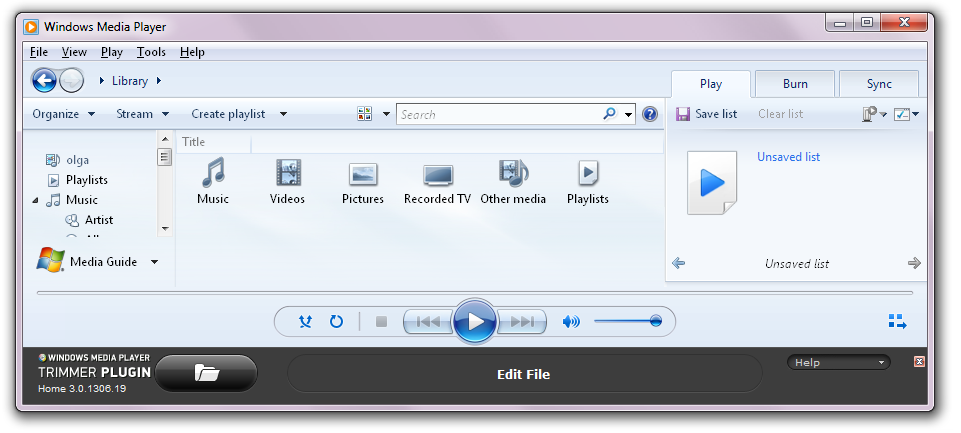
Figure 1
3. If you doesn't see Plugin, then enable the installed Plugin clicking the right mouse button and select from the list SolveigMM WMP Trimmer Plugin (Now Playing-->Plug-ins--> SolveigMM WMP Trimmer Plugin) as shown on the Figure 2.
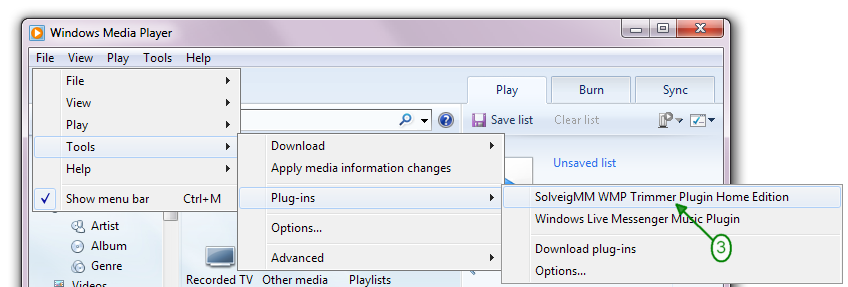
Figure 2
The Windows Media Player window will appear like on Figure 1.
The Table 1 contains the SolveigMM WMP Trimmer Plugin tool bar items description.
| Item | Control | Description |
|---|---|---|
|
|
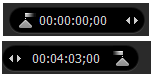
Start time edit control |
A start and end time interval of a media fragment. |
|
|
Current time edit control |
Shows the cursor current time position |
|
|
Add Marker Remove Marker(s) |
Add a new marker to the current slider cursor position. Remove the current marker or fragment |
|
|
Keep Selected Fragment Cut Selected Fragment |
Set the fragment type
Set the fragment type |
|
|
Trim button |
Saves the selected fragment to a file |
|
|
Cut out button |
Allows to open media file in Windows Media Player |
|
|
Slider markers |
Turn off/on the audio waveform |
 |
Story board Off/On |
Turn on/off the story board |
 |
Zoom In Zoom Out |
Increase the slider timeline resolution to make editing neighbouring markers more comfortable Decrease the slider timeline resolution |
 |
Invert time line fragments | Invert time line fragments |
 |
Set audio silence | Allows to set audio silence for the chosen fragment |
 |
Minimize the plugin |
Allows to minimize plugin interface view |
 |
Jump to movie end/start |
Allows to navigate to movie end/start |
|
|
Jump to previous/next K frame |
Allows to navigate to previous/next K frame |
 |
Play/pause |
Allows to start the playback of media file or to set the palyback on pause |
|
|
Help button |
Activates the list of possibility help buttons (Online and local) |
|
|
Online help button |
Opens the How To page |
|
|
Local help button |
Opens local help file |










4. To open the source audio file press the Alt button on the keyboard and choose File-->Open…. from the context menu (Figure 3). Or open your file using "Open Media File" button (Figure 4).
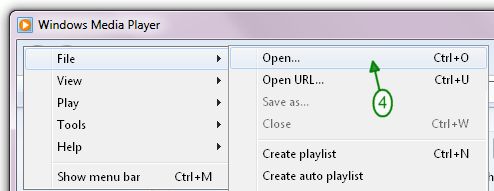
Figure 3

Figure 4
5. Select the audio file you want to use for the ringtone making and double click on it or use Open button (Figure 5).
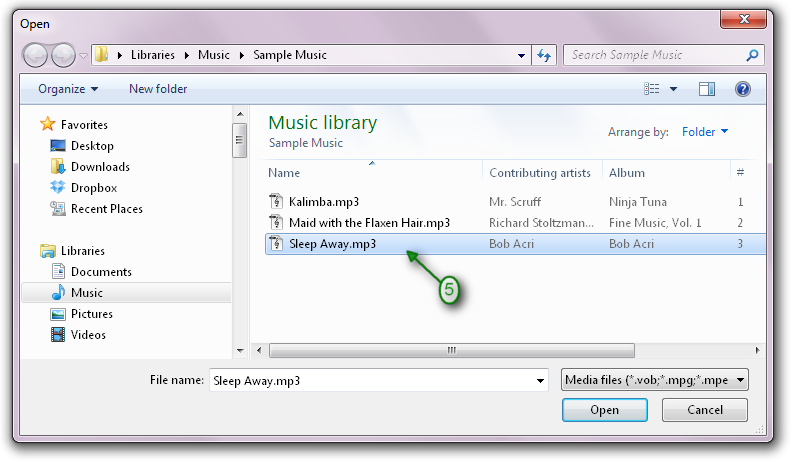
Figure 5
6.Click on "Edit" button to enable WMP Trimmer Plugin extanded view (Figure 7).

Figure 6
7. Set the start time of fragment by moving the left marker at the biginning of the timeline to the start position of the fragment or use slider and Add marker button to specify the beginning of your audio file (Figure 8)
8. Set the end time of fragment by moving the right marker at the end of the timeline to the end position of fragment or use slider and Add marker button to specify the end of your audio file (Figure 8).
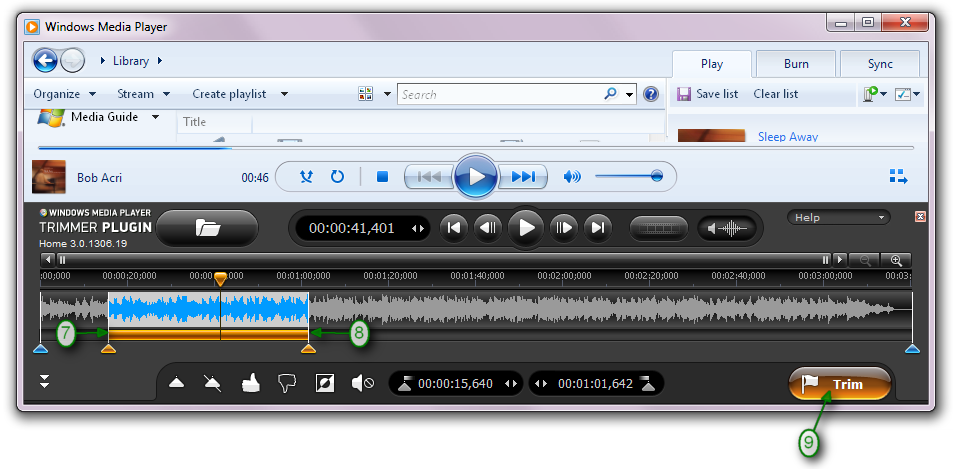
Figure 7
9. To save the specified fragment to an output file click the "Trim" button (Figure 8)
10. Enter the resulting file name (Figure 9)
11. Click the Save button (Figure 9)
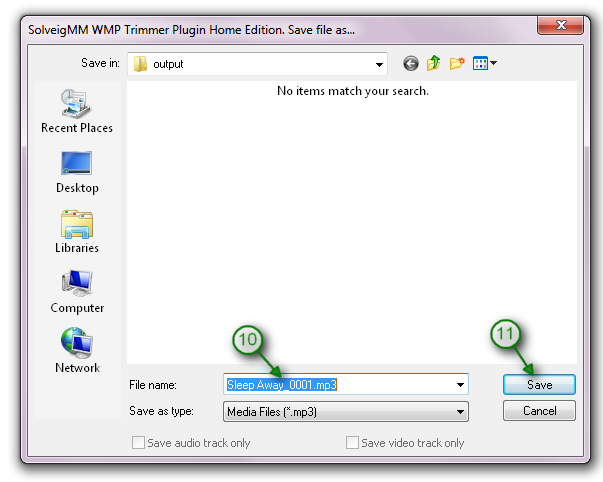
Figure 8
12. When the task will be completed, the window SolveigMM WMP Trimmer Plugin appears (Figure 10).
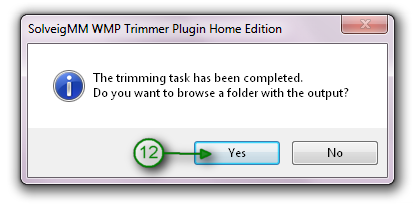
Figure 9
13. To pass into the folder with edited ringtone click the Yes button (Figure 11)
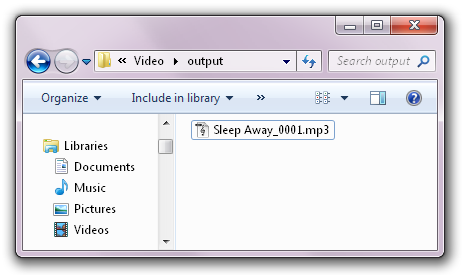
Figure 10
14. It is time to upload the result to a mobile phone and assign that as a ringtone. Usually it can be made through data cable or Bluetooth interface.
- https://www.solveigmm.com/en/support/howto/how-to-join-mp3-files-with-video-splitter/
- https://www.solveigmm.com/en/support/howto/how-to-rip-audio-from-video-with-video-splitter/
 Olga Krovyakova is the Technical Support Manager in Solveig Multimedia since 2010.
She is the author of many text and video guidelines of company's products: Video Splitter, HyperCam, WMP Trimmer Plugin, AVI Trimmer+ and TriMP4.
She works with programs every day and therefore knows very well how they work. Сontact Olga via support@solveigmm.com if you have any questions. She will gladly assist you!