Show Posts

This section allows you to view all posts made by this member. Note that you can only see posts made in areas you currently have access to.

Messages - Olga Krovyakova

Pages: [1] 2 3 ... 82
1
Добрый день, Tjuurko!

Спасибо за ваше сообщение.

Скажите, пожалуйста, какую операционную систему вы используете в настоящее время?
Video Splitter 6 в настоящий момент больше не обновляется и не поддерживается.
Попробуйте, пожалуйста, использовать Video Splitter 9.
Данная версия работает на Windows 7, 8, 10, 11.

Загрузить Video Spllitter 9 можно здесь:
https://www.solveigmm.com/ru/products/video-splitter/

Если у вас будут сложности с загрузкой или запуском программы, пожалуйста, сообщите.
2
General Discussion / Re: Subtitle and multiple audio track support?!
« on: March 30, 2026, 07:44:34 PM »
Hello Jassy_Casper,

Thank you for your post.

By default, Video Splitter should select all streams for preview and editing (you can see this in Control / Stream selection), when you place the file to the timeline from the Media library or if drag and drop the file to the timeline.
If you see that not all streams from the file are selected in this dialog box after placing the file on the timeline, could you please upload for us such file to Google drive (drive.google.com)?
Also please send us the project file - to get it select segments for saving and deletin then go to File / Save project as.

Also, what do you mean that it handles streams differently for MKV and MP4? Please describe this difference.
Screenshots are also appreciated.
You can send your reply to support(at)solveigmm(dot)com for convenience.

Thank you in advance.

3
Hello hani,

Thank you for your reply.
Currently you can hold on the hot keys Shift + Right, Shift + Left to navigate to the needed position forward or backward and see the changes of preview in the real time.
We will possibly add the feature of adding the same action for holding the approprite "Jump Forward" /"Jump Backward" buttons.
If this will be added, we will write at this topic.

4
Hello,

Thank you for your post.
Unfortunately the option to playback video with the selectable speed is not yet available at the present time.
We will possibly add such feauture to the next Video Splitter's releases.
If you need additional option for navigation, you can enable the setting in Tools / Preferences / View / Jump Backward and Jump Forward buttons.
Right mouse click on the "Jump Forward" button, you will see the menu where you can set the needed Step you want to use for navigation.
You can also use the bottom settings of the same menu to select the desired step in minutes or seconds.

5
Здравствуйте,

Спасибо за ваш пост.
pyv5 это скорее не кодек, а fourcc, которые используют камеры видеонаблюдения.
Вы можете попробовать

1. Открыть файл через ffmpeg
2. Принудительно перекодировать также через ffmpeg
3. Изменить FOURCC (если это замаскированный XVID/H264)

Программами:
AVI FourCC Code Changer
VirtualDub

4. Использовать родной плеер камеры/DVR, если файл с видеорегистратора

Также вы можете сделать дамп видео стрима и попробовать открыть его в каком-нибудь видео анализаторе.

Вы можете оставить отзыв о технической поддержке по ссылке ниже:

https://www.trustpilot.com/review/solveigmm.com

Заранее спасибо!

6
Hello shaneronan,

Thank you for your post.
The frame-accurate editing is used in HTML5 Video Editor Version 2.5 by default, so you can be sure that all editing results will be accurate.

7
SolveigMM Video Editing SDK / HTML5 Video Editor - meet version 2.5 release
« on: February 12, 2026, 07:01:14 PM »
We are excited to announce the launch of HTML5 Video Editor Version 2.5. The update included Frame-Accurate Trimming via Time Edit Boxes for unparalleled precision, a Dual Viewer for seamless comparison editing, Adjustable Panel Divider for a more flexible and customizable workspace. Editors will also benefit from  AI-Based Sport Highlight Detection to automatically find key action, saving you valuable searching time, and some other features. These advancements deliver a faster, more intelligent, and highly customizable editing experience. Learn more about version 2.5 in our blog.


8
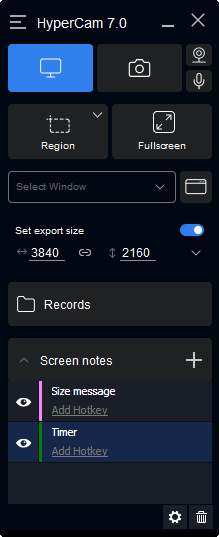
SolveigMM с радостью представляет HyperCam 7 — значительное обновление, призванное революционизировать процесс записи экрана.
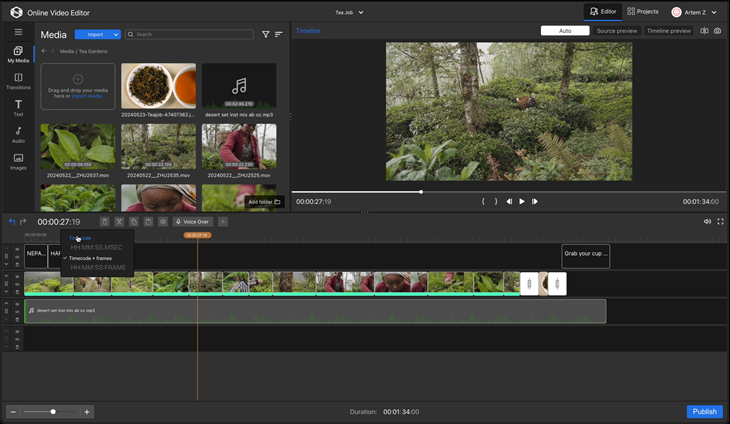
HyperCam 7 получил полностью переработанный интерфейс для более плавного рабочего процесса и быстрого доступа к функциям. Кроме того, он поддерживает аппаратное ускорение Intel QuickSync, обеспечивая повышенную производительность и захват видео в разрешении до 4K.
Оптимизируйте свою работу благодаря бесшовной интеграции для мгновенного онлайн-редактирования и встроенной функции обмена файлами, что значительно упрощает совместную работу и публикацию материалов.
Оцените более быструю, креативную и удобную запись экрана уже сегодня!
Узнайте обо всех новых функциях.

Узнать больше в пресс-релизе. Скачать HyperCam 7.


9
HyperCam / HyperCam 7 - New features for clever video recording
« on: February 12, 2026, 06:20:51 PM »
SolveigMM is excited to unveil HyperCam 7, a significant upgrade designed to revolutionize your screen recording experience. Featuring a completely redesigned interface for smoother workflows and faster access to key features, HyperCam 7 also boasts Intel QuickSync hardware acceleration for up to 4K video capture and improved performance. Streamline your process even further with seamless integration for immediate online editing and built-in file-sharing, making collaboration and review effortless. Experience faster, more creative, and user-friendly screen recording with HyperCam 7. See the whole list of new features and changes.

Read our press release to discover more. Download HyperCam 7 and try it today!

HyperCam 7 updated tutorial is available here.


10
SolveigMM freut sich, HyperCam 7 vorstellen zu dürfen, ein bedeutendes Upgrade, das Ihre Bildschirmaufzeichnung revolutionieren wird. Mit einer komplett überarbeiteten Benutzeroberfläche für reibungslosere Arbeitsabläufe und schnelleren Zugriff auf wichtige Funktionen bietet HyperCam 7 außerdem Intel QuickSync-Hardwarebeschleunigung für Videoaufnahmen mit bis zu 4K-Auflösung und verbesserte Leistung. Optimieren Sie Ihre Arbeitsabläufe noch weiter durch nahtlose Integration für sofortige Online-Bearbeitung und integrierte Dateifreigabe, wodurch Zusammenarbeit und Überprüfung zum Kinderspiel werden. Erleben Sie mit HyperCam 7 eine schnellere, kreativere und benutzerfreundlichere Bildschirmaufzeichnung. Sehen Sie sich die gesamte Liste der neuen Funktionen und Änderungen an.

Lesen Sie unsere Pressemitteilung, um mehr zu erfahren. Laden Sie HyperCam 7 herunter und probieren Sie es noch heute aus!


11
Hello,

Thank you for your interest.

The next New Year sale will be available in the December 2026 and January 2027. We hold on promotions on main events, dates and holidays.
The next promotion we suppose to be in February on Valentine’s day.
If you need the software earlier, please contact us at support@solveigmm.com and specify what our product you are interested in.

12
Добрый день, max88888!

Проблемы при проигрывании файла с AV1 кодеком и с рассинхронизацией видео/звука после редактирования, описанные вами, исправили в версии по ссылке ниже, попробуйте ее использовать, пожалуйста:

https://drive.google.com/file/d/1WjtO4J5_cRlT9QTtP26MS9o3i1Ghduku/view?usp=sharing

Сообщите о вашем результате.

Заранее спасибо!

13
Большое спасибо за присланные файлы!
Все проблемы воспроизвели на нашей стороне.
Как выйдет исправленная рабочая версия, напишем в этой теме.

14
Здравствуйте, max88888!

Спасибо за ваш ответ.

Могли бы вы, пожалуйста, прислать нам образец вашего оригинального файла, с которым возникает данные проблемы?
Также пришлите, пожалуйста, файл проекта от Video Splitter (выберите интервалы для сохранения и перейдите в меню Файл / Сохранить проект как).

Можно загрузить файлы на любой удобный вам сервис передачи файлов, например, Google drive или Yandex Диск.

15
Здравствуйте,

Вы можете попробовать использовать Video Splitter с поддержкой кодека AV1 по ссылке ниже:

https://drive.google.com/file/d/1AiAQIReZp8zk_z5uZUsWuH-7C-6gKQ4J/view?usp=drive_link

Если у вас возникнут какие-либо вопросы, буду рада помочь.

Pages: [1] 2 3 ... 82