Show Posts

This section allows you to view all posts made by this member. Note that you can only see posts made in areas you currently have access to.

Messages - Olga Krovyakova

Pages: 1 ... 73 74 [75] 76 77 ... 82
1111
Video Splitter / Re: XP SP1 and AVI files freeze
« on: October 31, 2011, 03:44:47 PM »
Hello Travolter,

Unfortunately we have not sollution for this problem at present time.

I have asked Microsoft to help us with this it.

http://social.msdn.microsoft.com/Forums/en-US/windowsdirectshowdevelopment/thread/0f948a79-b61f-482f-8566-c3949280f7d3

Hope they will help to find the way to prevent this freezing.
1112
HyperCam / Re: Sound didn't record
« on: October 26, 2011, 03:20:14 PM »
Hello Hypercam_fan,

Thank you for your feedback.

It is not entirely clear how you can hear the sound recording from your desktop and at the same time stereo mix setting is not working?

What sound from your desktop do you hear? May be it is only mouse clicks? Or the sound recording doesn't work only when you try to record video from some web-site? If am right, please specify what is it.

1113
Video Splitter / Re: Video scroller bar not working.
« on: October 25, 2011, 03:20:33 PM »
Hello Nuser,

Unfortunately there are still no news for this problem.

1114
Video Splitter / Re: fails to work
« on: October 25, 2011, 02:59:33 PM »
Hello Pandrew3,

Thank you for contacting us.

Video Splitter use codecs for 32-bit systems. Please try to install such codecs, e.g. from the links below:

http://www.windows7codecs.com/

http://www.codecguide.com/

If this will not help then could you please send us the log files?

To get them:

1) Download the archiv below:
http://dl.dropbox.com/u/18960201/LoggingForSplitter.zip
2) Launch the "EnableLOG.reg" file to start log files recording.
3) Launch Video Splitter and open the file with which you have the crash.
4) When the crach will happen, go to C:\Documents and Settings\User_name\My_documents\Solveig Multimedia\Logs and send us please (support(at)solveigmm(dot)com) all its content.
5) To disable log files recording launch the "DisableLOG.reg" file.

Thanks in advance.

1115
Video Splitter / Re: Problem with splitting WMV file
« on: October 25, 2011, 01:21:15 PM »
Hello tmooney,

Thank you for contacting us.

Unfortunately the frame accurate editing is not possiple for such WMV files with G2MC codec.

But could you please send us the small sample of such file for we could check if it is possible to set another encoder in the Preferences window of Video Splitter?
You can upload the file to any file host service, e.g. to dropbox.com, and send the link to file to support(at)solveigmm(dot).com.


1116
Video Splitter / Re: Cannot unistall to install new version?
« on: October 24, 2011, 04:51:31 PM »
Hello Ollie,

Could you please let us know if the suggestion of Hypercam_fan was helpful for you?

1117
Здравствуйте, Rafamans,

Да, реализация этой возможности есть планах, правда пока не могу назвать конкретный срок, когда появится такая версия.

1118
Здравствуйте, Rafamans,

Спасибо за вопрос.

К сожалению, это действительно так, c AVI Trimmer + MKV возможно сохранить только одну звуковую дорожку, если в исходном файле их несколько.

1119
Hello Yourick17,


Thank you for your question.

Yes, there is no MP4 files support in Video  Splitter 2.5 release.

But you can still use Video Splitter 2.4 beta for such files editing:

http://www.solveigmm.com/download/SolveigMM_Video_Splitter_2_4_Beta.exe

1120
SolveigMM Video Splitter 2.5 wurde veröffentlicht http://www.solveigmm.com/de/produkte/video-splitter/

Press release: http://www.solveigmm.com/de/presse/hohe-geschwindigkeit-beim-videoschnitt-mit-neuem-video-splitter-25-von-solveig-multimedia/

Neue Funktionen:

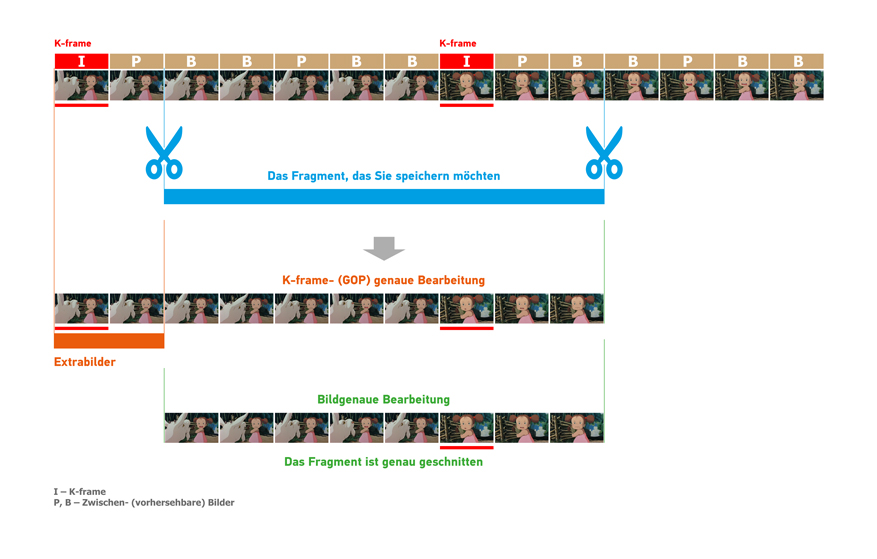
Bildgenauigkeit für WMV-Dateien (WMV1, WMV2, WMV3, MSS2)
Portable version
Validierung von WMV-Dateien
Indizierung von MPEG1/MPEG2 Dateien aus dem ausgewählten Ordner
Lokalisierung für Deutsch, Russisch und Chinesisch

Was ist neu in 2.5 auf Youtube


Was ist Frame-genaue Bearbeitung -


1121
Diskussion der Produkte auf Deutsch / Release von HyperCam 3.3
« on: September 21, 2011, 01:20:49 PM »
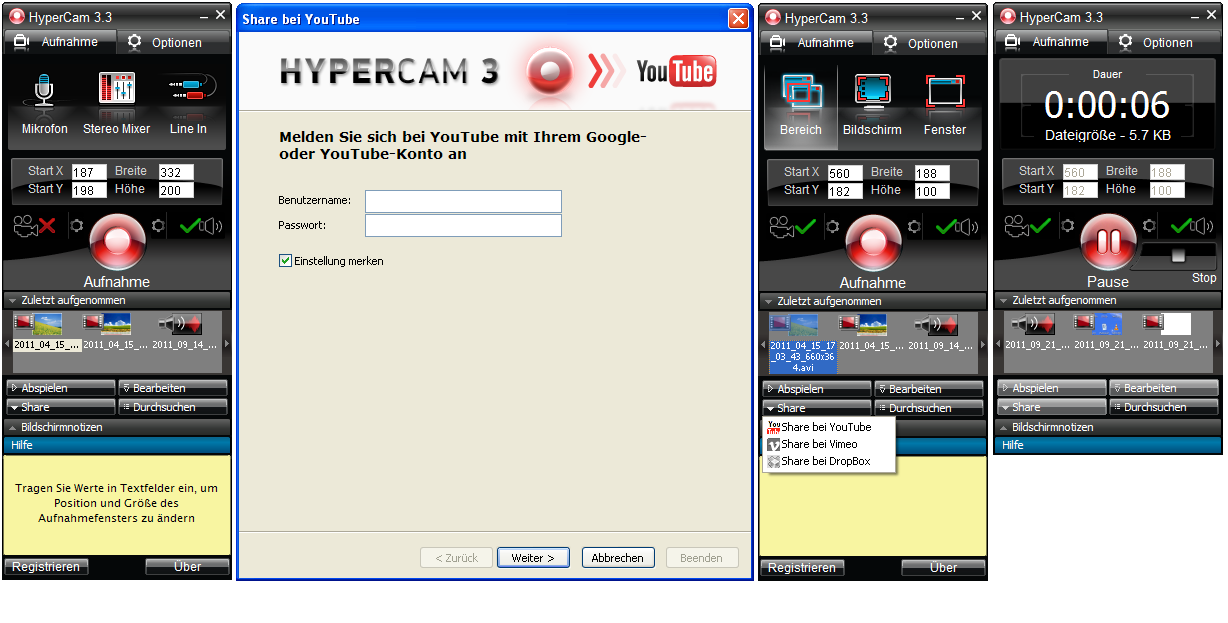
Neue HyperCam Version 3.3 ist als Download verfügbar.

Unter den neuen Funktionen:

Dauer der Aufnahme-Datei wird angezeigt
Aufnahme von Nur-Audiodateien in WAV/WMA/MP3-Formaten
Anzeige des Dateityps der aufgenommenen Datei im „Zuletzt-Aufgenommen“-Fenster (für Video, Screenshots, Ton)
Portable Installation
Hochladen auf YouTube
Bearbeitung von WMV-Dateien mit Bildgenauigkeit im HyperCam-Media Editor
Kontextmenü wurde zum Block „Zuletzt Aufgenommen“ hinzugefügt
In jedem Hinweisfenster wurde ein bezeichnendes Icon hinzugefügt

Weitere Details finden Sie unter: http://www.solveigmm.com/de/products/hypercam/


1122
HyperCam / HyperCam 3.3 release
« on: September 21, 2011, 01:14:28 PM »
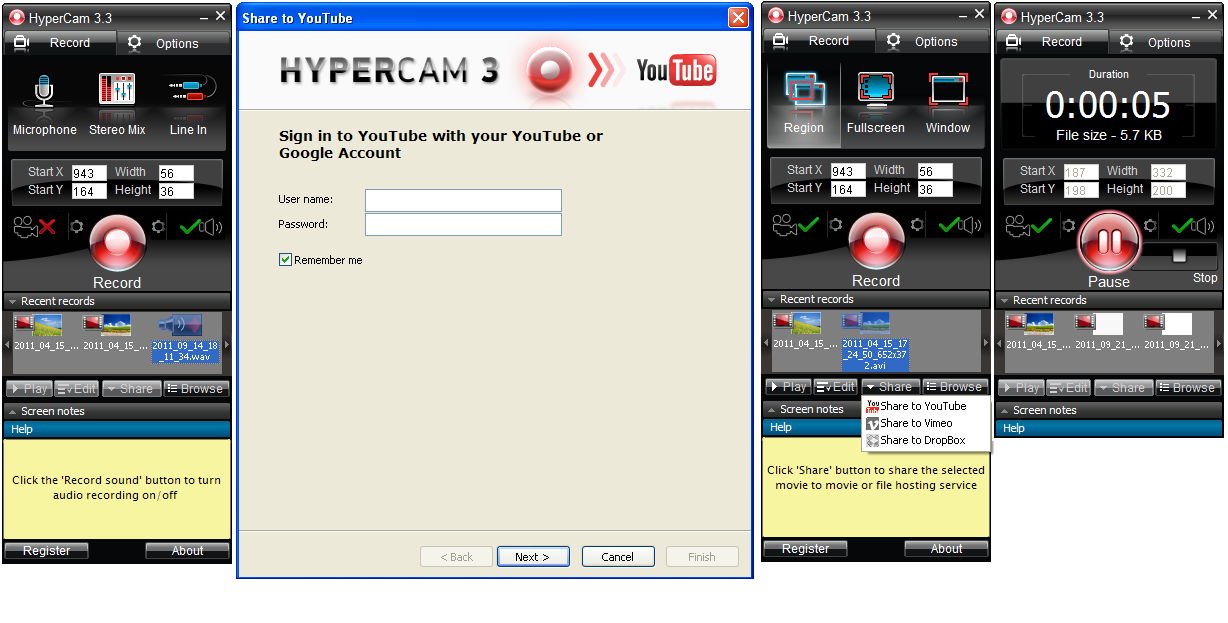
New HyperCam 3.3 version is available for the download.

Among new features:


Display of duration of the recorded file
Recording audio-only files in WAV/WMA/MP3 formats
Display of filetype of the recorded file in the recent files window (for video, screenshots, a sound)
Portable installation
Upload to YouTube
Option of editing WMV files with frame accuracy in HyperCam Media Editor
Context menu on recent records was added
To each message box a characteristic icon was added

More details please find at:

http://www.solveigmm.com/en/products/hypercam/


1123
HyperCam / Re: HyperCam_3_2_1107_8 does not load
« on: September 14, 2011, 04:23:28 PM »
Hello Ed,


Thank you for your post.

Could you please send us log files for we could find out the problem reason:

To receive them:

1) Please download "enable_log.zip" file from the link below:
http://dl.dropbox.com/u/18960201/enable_log.zip

2) Launch "enable_log.bat"  file.
3) Launch HyperCam.
4) After it will crash (freez) go to "C:\Documents and Settings\Your user name\My documents\HyperCam3\LOG"  and please send me all the "LOG" folder content to support(at)solveigmm.com

Please specify what operating system do you have?

Thank you for the patience.

1124
HyperCam / Re: automatic start-up
« on: September 05, 2011, 04:50:53 PM »
Hello Dawdaw,


Thank you for your question and please excuse us for the delayed answer.

Please follow this steps to do this:

1. Launch HyperCam and make setting for the recording then close it. All the made settings will be saved with the next startup of HyperCam. 

2. Set the HyperCam startup as it is described in the short guideline below:
http://windows.microsoft.com/en-US/windows7/Run-a-program-automatically-when-Windows-starts

3. In the properties of the newly created shortcut in the "target" field please enter the "-rec" and "-hidden" parameters. You should receive the following: "C:\Program Files\HyperCam 3\SMM_HyperCam.exe" -rec -hidden

4. Create the shortcut of HyperCam on your desktop. With right mouse click choose "Properties" and enter to the "target" field the  "-show" parameter. You should receive the following: "C:\Program Files\HyperCam 3\SMM_HyperCam.exe" -show

Now when you start Windows, HyperCam will automatically run and record the screen area being chosen previously.

This region will be highlighted at the same time. To see HyperCam running window, just click on HyperCam icon on your desktop.

1125
Hello BobS,

Thank you for the detailed description.

This problem was probably caused by some Antivirus program.

Please try to  switch it off while you will be downloading and installing AVI Trimmer + MKV.

Download the installation file of AVI Trimmer with turned off your Antivrus program and try to install it.

http://www.solveigmm.com/en/products/avi-trimmer-mkv/#Download

Could you please let us know if it will help you and please specify what Antivirus program do you use?

Pages: 1 ... 73 74 [75] 76 77 ... 82