Show Posts

This section allows you to view all posts made by this member. Note that you can only see posts made in areas you currently have access to.

Messages - Olga Krovyakova

Pages: 1 ... 63 64 [65] 66 67 ... 82
961
Video Splitter / Re: Runtime Error when cutting mkv
« on: December 27, 2012, 06:25:48 PM »
Hello Flo,

Thank you for contacting us and please excuse for the delayed answer.

Could you please upload the sample of your original file to any file host service, e.g. to filedropper.com?

And send us please to support(at)solveigmm(dot)com the project file (File -> Save Project as) after you choose the fragments for saving. 

It will be helpful for us if you could also record and send log files. Here is guideline on how to get them:

http://www.solveigmm.com/en/faq/how-to-record-log-files-of-solveigmm-video-splitter/

Thank you in advance.
962
Здравствуйте ALGOL,

Спасибо за сообщение и извините за задержку с ответом.

Попробуйте, пожалуйста, установить бэта-версию  программы, возникнет ли с ней данная проблема?

http://solveigmm.com/download/SolveigMM_Video_Splitter_3_5_Beta.exe

Если проблема останется, не могли бы вы загрузить исходный файл на любой файлообменник, например, на filedropper.com и прислать нам на support(at)solveigmm(dot)com?
Пришлите, пожалуйста, еще файл проекта. После того как выберите интервалы для сохранения перейдите в меню Файл ->Сохранить проект как...

Нам бы также были бы полезны лог файлы. По ссылке ниже инструкция, как их можно получить:

http://www.solveigmm.com/en/faq/how-to-record-log-files-of-solveigmm-video-splitter/

Заранее спасибо.

963
General Discussion / Re: Encountered an error HyperCam improprer argument.
« on: December 19, 2012, 02:00:27 PM »
Hello Victor1818,

Thank you for your post.

Possibly this problem was solved in the latest beta version available for download from the link below, please try to use it.

http://www.solveigmm.com/download/SolveigMM_HyperCam_3_5_Beta.exe

If this will not help, could you please record and send us log files to support(at)solveigmm(dot)com?
Please send us also screenshots of HyperCam options (Audio, Video, Extras, Interface tabs).

Thank you in advance.

964
Video Splitter / Re: no sound in SolveigMM player please help
« on: December 10, 2012, 03:56:59 PM »
Hello jimdays,

Thank you for your post.

I've checked your file and I hear sound in Video Splitter (version 3.5.1210.18 from its home page).

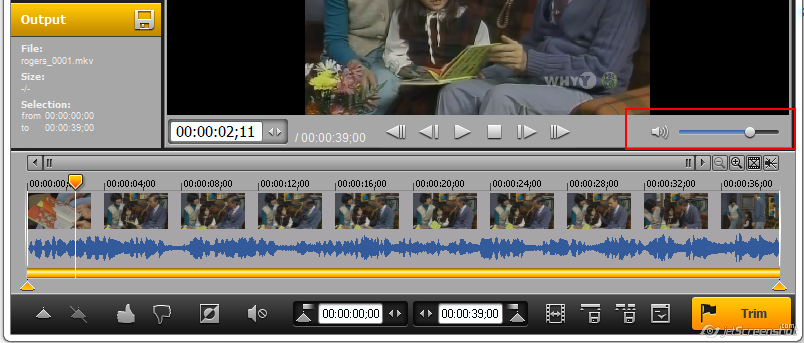
Please try to increase the sound level of the playback. Will it help you?


965
SolveigMM AVI Trimmer / Re: which video editing software should i use
« on: December 03, 2012, 05:53:54 PM »
Hello lilycarrly,

Thank you for your question.

You can use Video Splitter for this task.

To learn how to merge several AVI files, please take a look on this guideline.

More useful guidelines you can find on this page:

http://www.solveigmm.com/en/howto

If you wou would like to compare our products visit this page:

http://www.solveigmm.com/en/products/comparison/

966
SolveigMM AVI Trimmer / Re: Play button only does sound, not video
« on: November 27, 2012, 05:59:16 PM »
Hello swampwiz,

Thank you for your question.
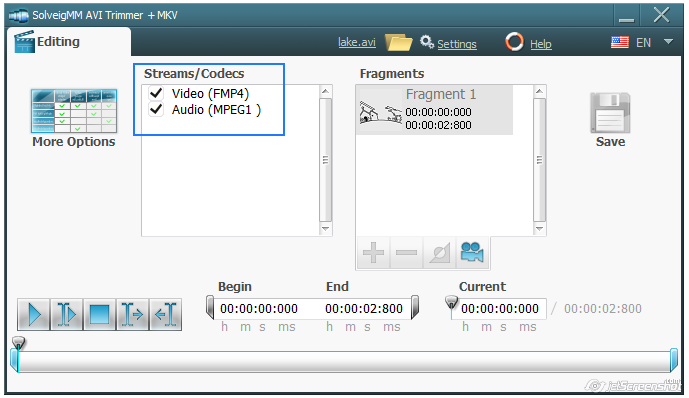
AVI Trimmer +MKV should play both video and audio content of your file. Please check if the Audio checkbox was enabled while the playback as on the screenshot below.

967
Hallo so-com,

Danke für Ihre Nachricht und Entschuldigung für die verspätete Antwort.

Quote
Klickt man auf Bildschirm entseht ja ein roter Rahmen und im Bereich der Höhe und Breite sollte die maximale Auflösung stehen. Auf einem anderen System mit Windows 7 ist dieses der Fall, allerdings auf diesem Laptop mit XP nicht. Hier wird die Höhe zwar richtig erkannt, allerdings steht bei der Breite nur 1360 ode manchmal auch 1364 dran (richtig wäre 1366).

Höhe und Breite sind automatisch durch die Software eingestellt, berechnet, welche Menge oder Anzahl, der wiederum abhängig von dem Videо Encoder.
Wenn ein WMW setzen, die Höhe und Breite muss ein Vielfaches von 16 sein. In anderen Fällen ansonsten ein Vielfaches von 8.

Quote
Weiter lässt sich über die Funktion Bereich zwar ein roter Kasten mit der Maus ziehen, nur bleibt der Kasten nicht an der Stelle. Bewegt man die Maus, bewegt sich der Kasten ebenfalls mit der Maus mit.

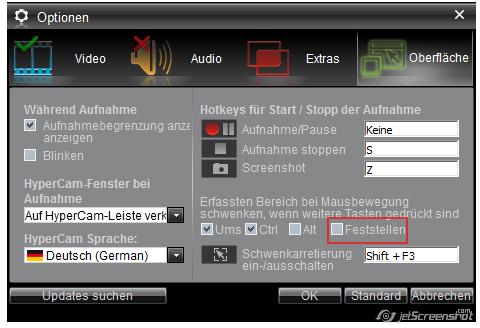
Sie versuchen, die "Feststellen"-Einstellung zu deaktivieren:


Wird es Ihnen helfen?

968
HyperCam / Re: Can't start recording graph issue on Hypercam 3.2
« on: November 19, 2012, 06:20:46 PM »
Hello naimoj,

Thank you for contacting us and please excuse for the delayed answer.

Could you please let us know on what stage do you get the following message?
Could you please record and send us log files?

Here is how to get them:

http://www.solveigmm.com/en/faq/how-to-record-log-files-for-hypercam-3/

Please send to us screenshots of your Options (Video, Audio, Extras, Interface) settings.

Thank you for your patience.

969
Video Splitter / Re: WMV splits audio cuts out after about 1 minute
« on: November 19, 2012, 05:36:13 PM »
Hello Mike,

Please excuse for the delayed answer.

Quote
Is this old code that has been "fixed" and brushed a bit and re-wrapped?

Please try to use this version
http://solveigmm.com/files/SolveigMM_Video_Splitter_2_5_1201_11_old.exe

and this
http://solveigmm.com/files/SolveigMM_Video_Splitter_3_0_1206_6_old.exe

Will it help you? If yes, please specify what of these two versions?

Quote
Update is buggy when other windows are behind.

Could you please let us from what version to what version have you tried to update?
What is your OS? Screenshot will be helpful to fix the problem (if you can reproduce this).

If you have the same problem as foobaz (audio is cutted out), then the file with the project file could help us to find and fix the problem reason.
Thank you.

970
Hello Mike,

Please take my apologies for the delayed answer.

Quote
First I had crashes / hangs when trying to save trimmed video. Moved files to local C drive and that seemed to fix it (quite annoying).

Am I right that you have tried to edit your file from some kind of external device (USB stick, external hard drive) or network folder? Do you get hangs when you click on the Trim button or on any other stage (please specify what exactly)?
If you could upload for us the file that you have tried to edit this will be very helpful for us.
Please upload also or send to support(at)solveigmm(dot)com the project file (File -> Save Project As).

Log files could be also be helful for us:
http://www.solveigmm.com/en/faq/how-to-record-log-files-of-solveigmm-video-splitter/

Quote
Now next problem: first few seconds in trimmed video shows no movement (freeze frames). It looks like SolveigMM video splitter is adding many frames with the same content. This is bad as we are trying to make video repeat. Then these freezed frames completely fucks up our repeat loop! Is this intentional or a bug?

Could you please upload your file for we could try to reproduce the problem on our end? You can upload it to e.g. filedropper.com.

Thank you for your patience.

971
SolveigMM WMP Trimmer Plug-In / Re: can’t set the source file
« on: October 24, 2012, 02:18:00 PM »
Hello bruner,

Thank you for file you have sent us to support. We will shortly answer to your email.
Thanks for patience.

972
SolveigMM AVI Trimmer / Re: default AVI or MKV codecs
« on: October 24, 2012, 02:03:55 PM »
Hello willemijns,

There is no the default codec, but common for AVI are XVID and DIVX, for MKV is AVC1.

973
General Discussion / Re: New to hypercam and needed help please.
« on: October 12, 2012, 05:41:58 PM »
Hello deedee,

Could you please specify your question more detailed?
Am I right that you have any problems with HyperCam 2 loading?

By the way, HyperCam 2 is not our product.
I recommed to contact you with Hyperionincs at support(at)hyperionics(dot)com.

974
Video Splitter / Re: Support for .flv files?
« on: October 09, 2012, 04:58:25 PM »
Hello terratec1234,

Thank you for your question.
Yes, flv support is planned for including in Video Splitter.
Unfortunately the exact date is still unknown.

975
Здравствуйте AlexN,

Спасибо Вам за совет.
Действительно, очень полезная функция.
Возможно добавим её в будущие выпуски программы.

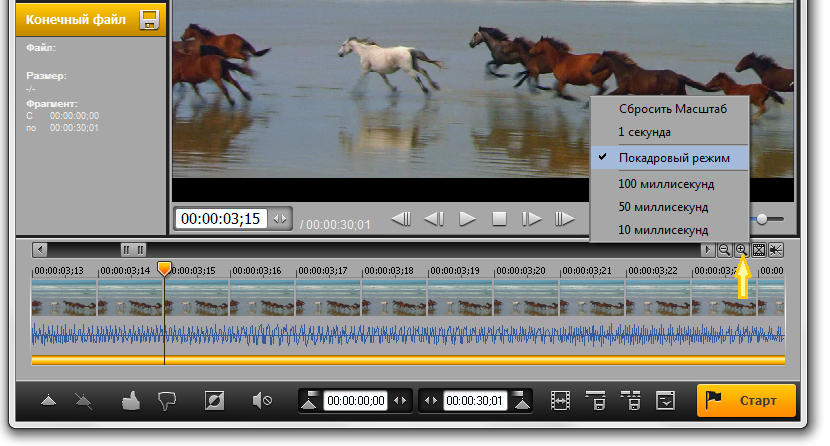
Пока, рекомендуем попробовать использовать визуальную шкалу времени, позволяющую выбрать начало/окончание фрагмента(ов) с точностью до кадра.
Вы можете изменять масштаб визуальной шкалы времени, например, с помощью соответствующей кнопки в области управления.


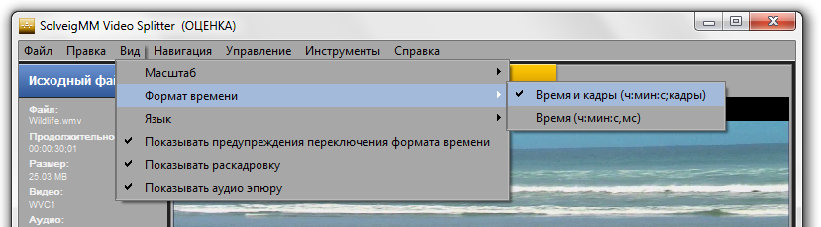
А также выбрать формат времени для шкалы в меню Вид (время-кадры и время (чч:мм:сс,мс)).


Pages: 1 ... 63 64 [65] 66 67 ... 82