Port
Port  Eng
Eng  Rus
Rus  Deu
Deu  Ital
Ital  Esp
Esp  Jap
Jap  Chin
Chin HyperCam Returns: Featuring a Redesigned Interface, Enhanced Speed, and a New Perspective on Screen Capture
Hamburg, November 19, 2025
What used to be simply called screen recording is often much more today: recording meetings, explaining tutorials, documenting bugs, or finally proving the last level. Those who have been doing this for a long time are familiar with HyperCam. Now the tool is available in version 8 — redesigned, technically refreshed, and enriched with several practical ideas.
Hardware on board, stuttering out of the way
At the heart of the new version is support for Intel QuickSync, the hardware acceleration feature of current Intel processors. Even with 4K recordings, everything remains smooth, and the computer seems unaffected — as if it had an invisible helper quietly doing the work.
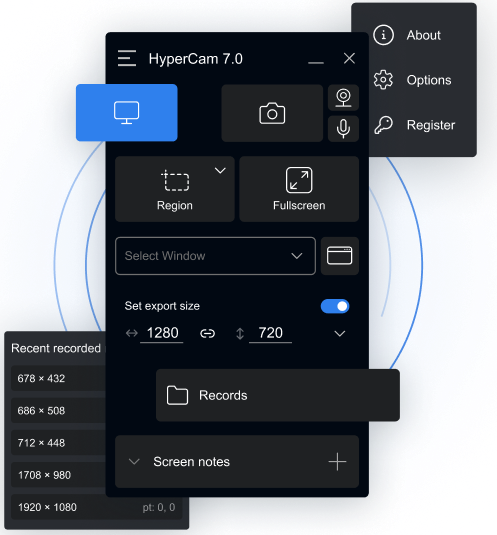
The user interface has also been redesigned. Not radically changed, but in such a way that you can get to what you need all the time more quickly – start recording, stop, save, share. It doesn't save you hours, but it does save you a lot of clicks in everyday use.
Record, edit, and share with online editor
Recordings can be cropped or shortened directly in HyperCam without the need for additional tools. For more advanced editing, an interface to a free online video editor is available, allowing recordings to be opened and customized immediately after creation. The editor is accessible via login and offers a seamless connection between the application and the web tool — a continuous workflow without exporting or external programs.
If you want to share your clips afterwards, use the integrated online sharing feature: upload and send links directly from the app. This is particularly useful for support teams, teachers, or anyone who regularly exchanges short screen videos. A quick preview of the latest recordings also makes it easier to check whether the desired sequence has been recorded in full.
What has changed behind the interface
The details have also been tweaked: screenshots can now be saved in various formats, supplemented by new camera overlays for marked or decorative sections. Anyone who has worked with older versions will immediately appreciate the clearer structure of the menus and options. A look behind the interface also shows that license management is now much easier: Licenses can be activated or transferred to another computer more easily, without detours or major hurdles.
What HyperCam actually does
For those who are not yet familiar with the program: HyperCam is Windows software that records what happens on the screen — including mouse movements, system sounds, and microphone comments. The tool was originally developed to create tutorials and demos, but is now also used for training, support, presentations, and game recordings.
Who needs it
HyperCam is aimed at people who not only use their screen but also want to show it: teachers, developers, support teams, YouTubers, gamers, or simply anyone who wants to explain something without having to describe it in a complicated way.
Prices and availability
HyperCam is software for Windows that can be used in a free version. This version has limited recording time and adds watermarks to recordings.
The Home and Business versions are available for unlimited use. Both offer all recording functions without time limits or watermarks.
The software can be purchased either as a subscription or as a one-time purchase. The subscription prices for Home are $6.49 per month or $39.95 per year. The Business edition costs $12.49 per month or $99.95 per year. As a one-time purchase, the prices are $79.95 for Home and $199.95 for Business. All prices exclude VAT.
Discounts are available for educational institutions and non-commercial use. Each license can be installed on up to five PCs, but only one device may be actively used at a time.
About Solveig Multimedia
Founded in 2003, Solveig Multimedia has been a leading manufacturer of digital audio, video and multimedia solutions for end users and professional developers. The SolveigMM product line includes Video Splitter, HyperCam, Zond 265 and AVI Trimmer + MKV.
For more information, please contact:
Solveig Multimedia