- Welcome to Solveig Multimedia Forum - Get help for video editing software.

Recent posts
#11
General Discussion / Re: Feedback: The software is ...
Last post by Olga Krovyakova - March 16, 2026, 11:31:28 AMHello hani,
Thank you for your reply.
Currently you can hold on the hot keys Shift + Right, Shift + Left to navigate to the needed position forward or backward and see the changes of preview in the real time.
We will possibly add the feature of adding the same action for holding the approprite "Jump Forward" /"Jump Backward" buttons.
If this will be added, we will write at this topic.
Thank you for your reply.
Currently you can hold on the hot keys Shift + Right, Shift + Left to navigate to the needed position forward or backward and see the changes of preview in the real time.
We will possibly add the feature of adding the same action for holding the approprite "Jump Forward" /"Jump Backward" buttons.
If this will be added, we will write at this topic.
#12
General Discussion / Re: Feedback: The software is ...
Last post by hani - March 16, 2026, 09:06:57 AMQuote from: Olga Krovyakova on March 06, 2026, 10:48:41 AMHello yes im already using that but i have a small problem with it, as i said if i hold the "Jump Forward" Key the video preview dont change in real time unless i stop holding the key it would be perfect if you can make the video preview change in real time when holding the key (just like the behavior of jump to the next k frame when i hold it the video preview change in real time)
Hello,
Thank you for your post.
Unfortunately the option to playback video with the selectable speed is not yet available at the present time.
We will possibly add such feauture to the next Video Splitter's releases.
If you need additional option for navigation, you can enable the setting in Tools / Preferences / View / Jump Backward and Jump Forward buttons.
Right mouse click on the "Jump Forward" button, you will see the menu where you can set the needed Step you want to use for navigation.
You can also use the bottom settings of the same menu to select the desired step in minutes or seconds.
#13
Обсуждение продуктов на Русском языке / Re: неизвестный кодек
Last post by ghfaq - March 06, 2026, 11:44:36 AMСпасибо за ответ. Все перечисленное проверено в первые дни, сижу над этим недели 3,плеера нет, производителя тоже( скорее всего действительно свой кодек, остается только гадать на родной плеер, если он вообще был в интернете),похожую ситуацию видел в 2018, там тоже самое только yvf5 кодек, тоже ноль информации о нём.
https://cloud.mail.ru/public/zXvg/QeNHM847E
https://cloud.mail.ru/public/zXvg/QeNHM847E
#14
General Discussion / Re: Feedback: The software is ...
Last post by Olga Krovyakova - March 06, 2026, 10:48:41 AMHello,
Thank you for your post.
Unfortunately the option to playback video with the selectable speed is not yet available at the present time.
We will possibly add such feauture to the next Video Splitter's releases.
If you need additional option for navigation, you can enable the setting in Tools / Preferences / View / Jump Backward and Jump Forward buttons.
Right mouse click on the "Jump Forward" button, you will see the menu where you can set the needed Step you want to use for navigation.
You can also use the bottom settings of the same menu to select the desired step in minutes or seconds.
Thank you for your post.
Unfortunately the option to playback video with the selectable speed is not yet available at the present time.
We will possibly add such feauture to the next Video Splitter's releases.
If you need additional option for navigation, you can enable the setting in Tools / Preferences / View / Jump Backward and Jump Forward buttons.
Right mouse click on the "Jump Forward" button, you will see the menu where you can set the needed Step you want to use for navigation.
You can also use the bottom settings of the same menu to select the desired step in minutes or seconds.
#15
Обсуждение продуктов на Русском языке / Re: неизвестный кодек
Last post by Olga Krovyakova - March 06, 2026, 09:02:30 AMЗдравствуйте,
Спасибо за ваш пост.
pyv5 это скорее не кодек, а fourcc, которые используют камеры видеонаблюдения.
Вы можете попробовать
1. Открыть файл через ffmpeg
2. Принудительно перекодировать также через ffmpeg
3. Изменить FOURCC (если это замаскированный XVID/H264)
Программами:
AVI FourCC Code Changer
VirtualDub
4. Использовать родной плеер камеры/DVR, если файл с видеорегистратора
Также вы можете сделать дамп видео стрима и попробовать открыть его в каком-нибудь видео анализаторе.
Вы можете оставить отзыв о технической поддержке по ссылке ниже:
https://www.trustpilot.com/review/solveigmm.com
Заранее спасибо!
Спасибо за ваш пост.
pyv5 это скорее не кодек, а fourcc, которые используют камеры видеонаблюдения.
Вы можете попробовать
1. Открыть файл через ffmpeg
2. Принудительно перекодировать также через ffmpeg
3. Изменить FOURCC (если это замаскированный XVID/H264)
Программами:
AVI FourCC Code Changer
VirtualDub
4. Использовать родной плеер камеры/DVR, если файл с видеорегистратора
Также вы можете сделать дамп видео стрима и попробовать открыть его в каком-нибудь видео анализаторе.
Вы можете оставить отзыв о технической поддержке по ссылке ниже:
https://www.trustpilot.com/review/solveigmm.com
Заранее спасибо!
#16
Обсуждение продуктов на Русском языке / неизвестный кодек
Last post by ghfaq - March 05, 2026, 07:57:42 PMЗдравствуйте, есть видео с камеры виденаблюдения,pyv5 codec,не открывается ничем, в hex никаких знакомых сигнатур не вижу, смена fourcc и принудительный запуск не помогает,40+ плееров также не открывают видео, включая китайские софтины, российские производители камер, и куча других, в интернете информации ноль, сталкивался кто-то с подобным?
#17
SolveigMM Video Editing SDK / Re: HTML5 Video Editor - meet ...
Last post by Olga Krovyakova - March 04, 2026, 07:45:13 AMHello shaneronan,
Thank you for your post.
The frame-accurate editing is used in HTML5 Video Editor Version 2.5 by default, so you can be sure that all editing results will be accurate.
Thank you for your post.
The frame-accurate editing is used in HTML5 Video Editor Version 2.5 by default, so you can be sure that all editing results will be accurate.
#18
SolveigMM Video Editing SDK / Re: HTML5 Video Editor - meet ...
Last post by shaneronan - March 02, 2026, 10:21:00 AMThese advancements in Version 2.5 deliver a superior editing experience, empowering you to create stunning videos with ease. What specific feature in HTML5 Video Editor Version 2.5 allows for frame-accurate trimming, enabling editors to make precise adjustments to their videos?
#19
SolveigMM Video Editing SDK / HTML5 Video Editor - meet vers...
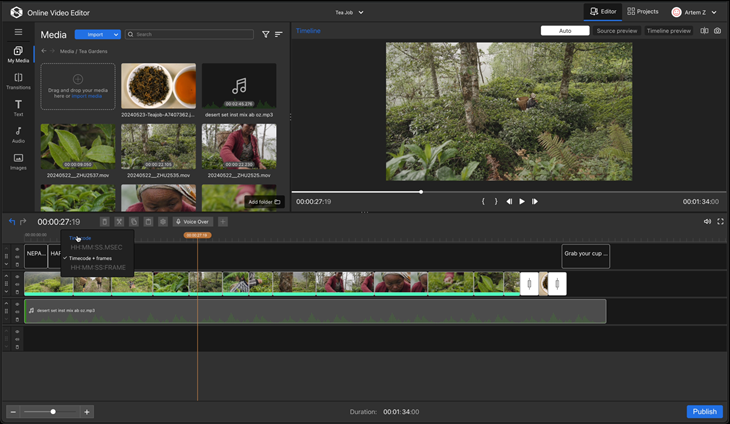
Last post by Olga Krovyakova - February 12, 2026, 12:01:14 PMWe are excited to announce the launch of HTML5 Video Editor Version 2.5. The update included Frame-Accurate Trimming via Time Edit Boxes for unparalleled precision, a Dual Viewer for seamless comparison editing, Adjustable Panel Divider for a more flexible and customizable workspace. Editors will also benefit from AI-Based Sport Highlight Detection to automatically find key action, saving you valuable searching time, and some other features. These advancements deliver a faster, more intelligent, and highly customizable editing experience. Learn more about version 2.5 in our blog.
#20
Обсуждение продуктов на Русском языке / HyperCam 7 - новые функции для...
Last post by Olga Krovyakova - February 12, 2026, 11:30:35 AMSolveigMM с радостью представляет HyperCam 7 — значительное обновление, призванное революционизировать процесс записи экрана.
HyperCam 7 получил полностью переработанный интерфейс для более плавного рабочего процесса и быстрого доступа к функциям. Кроме того, он поддерживает аппаратное ускорение Intel QuickSync, обеспечивая повышенную производительность и захват видео в разрешении до 4K.
Оптимизируйте свою работу благодаря бесшовной интеграции для мгновенного онлайн-редактирования и встроенной функции обмена файлами, что значительно упрощает совместную работу и публикацию материалов.
Оцените более быструю, креативную и удобную запись экрана уже сегодня!
Узнайте обо всех новых функциях.
Узнать больше в пресс-релизе. Скачать HyperCam 7.
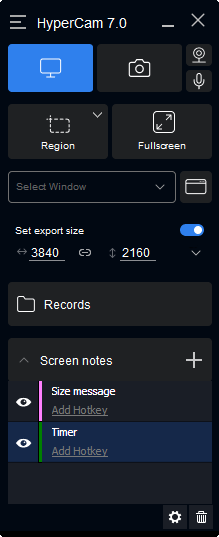
HyperCam 7 получил полностью переработанный интерфейс для более плавного рабочего процесса и быстрого доступа к функциям. Кроме того, он поддерживает аппаратное ускорение Intel QuickSync, обеспечивая повышенную производительность и захват видео в разрешении до 4K.
Оптимизируйте свою работу благодаря бесшовной интеграции для мгновенного онлайн-редактирования и встроенной функции обмена файлами, что значительно упрощает совместную работу и публикацию материалов.
Оцените более быструю, креативную и удобную запись экрана уже сегодня!
Узнайте обо всех новых функциях.
Узнать больше в пресс-релизе. Скачать HyperCam 7.