 Eng
Eng  Rus
Rus  Deu
Deu  Ital
Ital  Esp
Esp  Port
Port  Jap
Jap  Chin
Chin How to register HyperCam

By Olga Krovyakova - modified February 28, 2024, created April 1, 2019

You purchased HyperCam, have got your license key by email and now want to registered you installed version of HyperCam?
Here is the way how to activate the software.
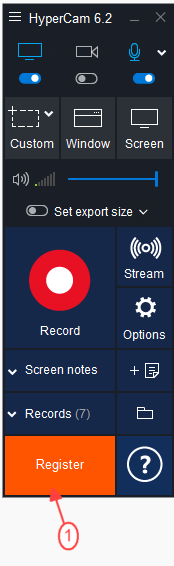
1. Launch HyperCam clicking by icon or your desktop or via the start menu. The main window should arise as depicted below:
2. Push Register button in bottom Help section
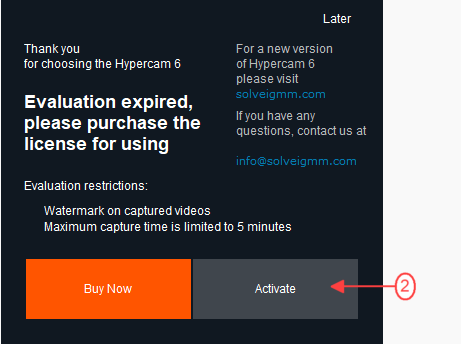
3. In appeared Licensing dialog insert the license key you received previously by email. The most convenient way is to copy and paste that.
Please be aware that the key in the example is not valid as you should use own one.
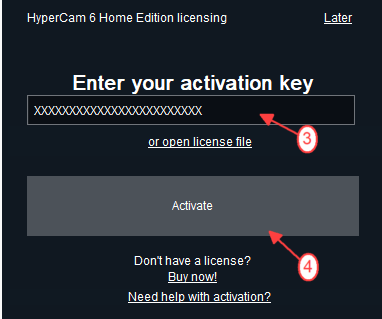
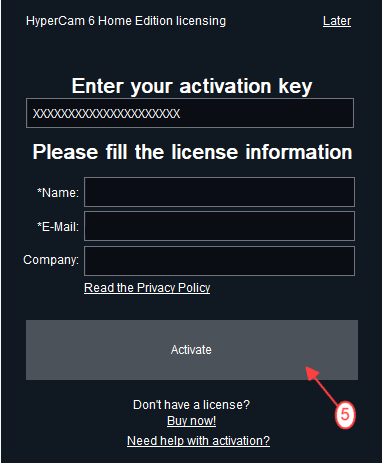
4. After you put in the license, the final action to register the product is to push Activate button.
5. As a confirmation you should get the following message box:
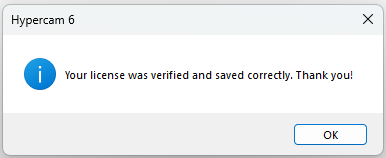
If you have received the message box that the activation was failed please check if HyperCam was installed correctly.
There should not be "portable" inscriptions at windows that appear when clicking aon the "About" and "Register" windows.
If you have inscriptions at these windows, please reinstall the product and do not tick the "Create portable installation on the removable or network disk" checkbox while the installation as the portable version needs the special license key for HyperCam Portable.
Thank you for becoming Solveig Multimedia customer, hope HyperCam will suit all your needs.
- https://www.solveigmm.com/en/howto/how-to-use-game-recorder-hypercam/
- https://www.solveigmm.com/en/howto/how-to-record-streaming-video-with-hypercam/
 Olga Krovyakova is the Technical Support Manager in Solveig Multimedia since 2010.
She is the author of many text and video guidelines of company's products: Video Splitter, HyperCam, WMP Trimmer Plugin, AVI Trimmer+ and TriMP4.
She works with programs every day and therefore knows very well how they work. Сontact Olga via support@solveigmm.com if you have any questions. She will gladly assist you!