 Eng
Eng  Rus
Rus  Deu
Deu  Ital
Ital  Esp
Esp  Port
Port  Jap
Jap  Chin
Chin How to repair WMV seeking

By Olga Krovyakova - March, 28 2019
It is a common case when we download WMV file from web, torrent or record live broadcasting and then, during playback, can't seek to a place we need to.
Most likely this Windows Media file doesn't comprise so called indexes.
In this guide you will see how to make such WMV file seekable in a few simple steps with SolveigMM Video Splitter.

1. To open a file, click the button shown in Figure 1. You can also use the Open Media File command in the File menu.
2. Select the required file by clicking your left mouse button on the name of the file.
3. Click the button to open the selected file.
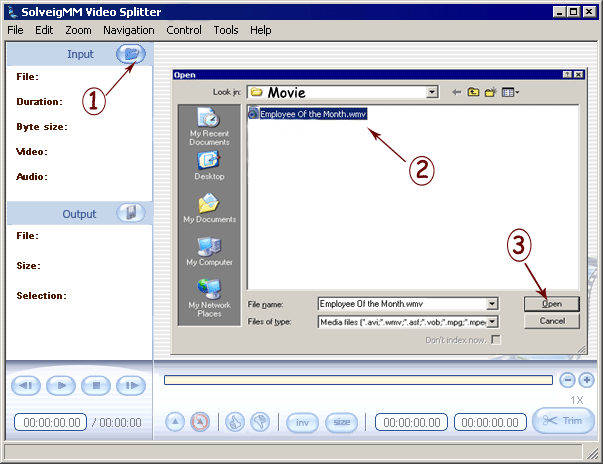
Figure 1
4. If your file does not have indexes SolveigMM Video Splitter will show a dialog as in Figure 2 with two options to index a file, by Indexing your original file or by Remuxing.

Figure 2
5. If your file is damaged it is possible the method "Index initial file" will fail . In this case just choose the second method - "Index by remuxing". You should be offered to specify the output folder (Figure 3)
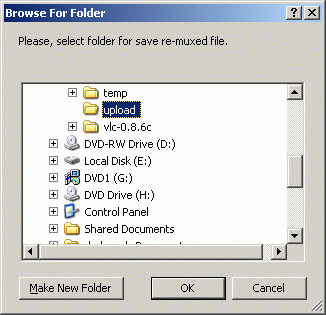
Figure 3
6. The remuxing process will be started and progress dialog will arise (Figure 4)

Figure 4
After the process is completed you should get able to play a resulted file with no seeking problem.
- https://www.solveigmm.com/en/howto/how-to-edit-wmv-file-with-video-splitter/
- https://www.solveigmm.com/en/howto/how-to-edit-mp3-file-with-video-splitter/
 Olga Krovyakova is the Technical Support Manager in Solveig Multimedia since 2010.
She is the author of many text and video guidelines of company's products: Video Splitter, HyperCam, WMP Trimmer Plugin, AVI Trimmer+ and TriMP4.
She works with programs every day and therefore knows very well how they work. Сontact Olga via support@solveigmm.com if you have any questions. She will gladly assist you!