Video Splitter Version History

box
Video Splitter 3.0

Easy to use and lossless video editor for AVC/H264, MP4, MKV, MOV, MPEG-2, WMV, ASF frame accurate trimming and joining. Splits AVI files with GOP accuracy. Batch mode and command line interface are included.

File info: 19.86 Mb, 2012 Apr 17

download 
3.0.1204.17, 2012-04-17
    Features:
  • GUI and help file Italian translation
    Fixes:
  • "SolveigMM Video Editing Engine works in Demo Mode" message using remux wmv file function and Index mpeg files in a folder function.
  • The size of the MP4 file after cutting more than the original
  • Artifacts in the middle of the file on trimming some AVCHD files
  • Audio out of sync or no sound in the trimming result of MP4 file with GOP accuracy mode
3.0.1203.19, 2012-03-19
    Fixes:
  • fix "Error: SolveigMM Video Editing object ver 1.3.11.7 or above is required" SMM_BatchSplit.exe using portable installation
3.0.1203.14, 2012-03-14
    Fixes:
  • Trimming hangs at 100% on some MKV files
  • Trimming hangs at 0% on MKV with interlaced AVC
  • Trimm and Join speed optimization on MP4 files
  • Running task using Batch Manager shows error "Can't Start Trimm process for current task" with message "Editing Engine works in Demo Mode"
3.0.1203.7, 2012-03-07
    Fixes:
  • Updated components for compatibility with latest SolveigMM Video Editing SDK 2.0 installation
  • No video after cut AVI files with H264 codec
  • Crash on trimming AVI with H264 codec
  • Too slow trimming AVCHD files
  • Fast forward playback of output file after trimming AVI
  • MPEG files trimming with MP3 audio makes result with audio that is playing fast
  • AVCHD trimming error "Not enough storage is avalable to process this command"
  • Unable to play AVCHD files with muxed teletext
  • WMV files trimming hang up
3.0.1202.8, 2012-02-08
    Fixes:
  • MPEG 1/2 trimming is not accurate
  • MPEG 1/2 trimming too slow and can not be completed
  • Too slow editing on some MP4 files
  • WMV trimming hangs sometimes
3.0.1201.27, 2012-01-27
    Fixes:
  • Progress hangs at 0% sometimes when trimming mp3 file
  • Chinese and French translations of the user interface and help files was updated
  • No selection of time is displayed in the editing window when use spin buttons
  • Times editing windows shouldn't be active when only one marker is selected
  • When you click on "zoom in / out", hot key "Space" shouldn't reiterate this operation
3.0.1201.23, 2012-01-23
    Fixes:
  • Restored "stop" button to navigation panel
  • "Class not Registered" error on trimming avc video in Portable installation
3.0.1201.19, 2012-01-19
    Features:
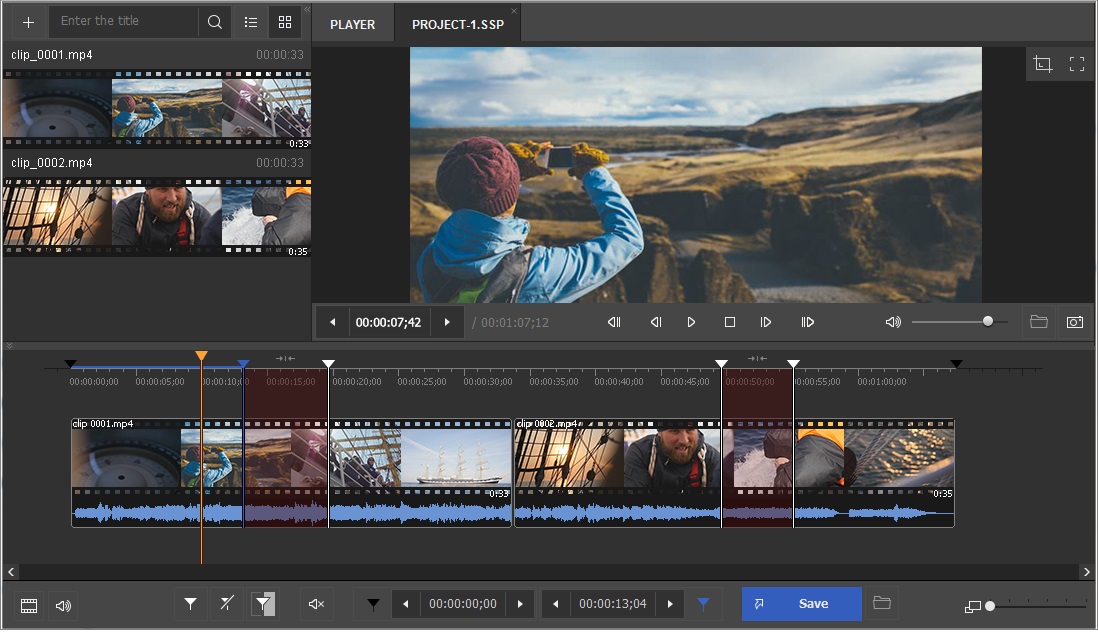
  • New and improved interface
  • MOV/MKV/MP4/AVCHD formats frame accurate trimming and joining
  • Thumbnails on timeline feature
  • Time format switching (time and frame\ time)
  • Now it is possible to set markers within a frame (it is useful in case one frame is too long - 1 minute or so)
2.5.1111.7, 2011-11-07
    Fixes:
  • Wrong font size of menu items on winXP
  • WMV trimming hangs sometimes when select interval at the end of the file
2.5.1110.27, 2011-10-27
    Features:
  • Added French translation (interface and help)
    Fixes:
  • Updated help file for German
2.5.1110.18, 2011-10-18
    Fixes:
  • Fixed program hang when cutting multiple parts from avi file that contains only video
2.5.1110.17, 2011-10-17
    Fixes:
  • Fixed memory leaks when you resize the main window.
2.5.1110.10, 2011-10-10
    Fixes:
  • Update user guide in Russian
2.5.1109.29, 2011-09-29
    Fixes:
  • Program hangs when canceling cutting wmv file
  • Program hangs when adding mp3 file to Join Manager
  • Synchronization of selected tracks in the Control menu with the settings save dialog
  • Crash when editing avi files containing AAC audio
  • Updated help files
  • Program hangs when saving avi to asf
  • Program failure in Batch manager's list when switching interface language
  • Error "Can't Start Trimm Process" when select option "Save Selected Fragment As"
2.5.1109.26, 2011-09-26
    Features:
  • Frame accuracy for WMV files (WMV1, WMV2, WMV3, MSS2)
  • Portable version
  • Validation of WMV files
  • Indexing of MPEG1/MPEG2 files from the selected folder
  • Localization to German, Russian and Chinese languages
2.3.1108.23, 2011-08-23
    Fixes:
  • Speeded up trimming and joining process on wmv files
  • Increased speed of joining on avi files
  • Updated design of installation package
2.3.1108.11, 2011-08-11
    Fixes:
  • Help file was updated
2.3.1105.25, 2011-05-25
    Fixes:
  • Error "No conversion available for selected input" on trimming wav file after mpeg2
  • Error "Destination file has not been set" on trimming wma file after mpeg2
  • Wrong K-frame navigation on avi/ wmv files (skipping frames)
  • Changed default extentions on selecting output mpeg2
2.3.1104.25, 2011-04-25
    Fixes:
  • Fixed crash on some AVI files trimming
  • Invalid file after trimming AVI with h264/avc video
  • Error 0x8007000e after multiple AVI files trimming
2.3.1103.30, 2011-03-30
    Features:
  • Simplification of product registration process
  • Sound Volume control
  • WAV files support
  • MPEG-1 files support
  • Automatic check updates feature
  • Recent files menu
  • GOP accuracy trimming mode for MPEG-2
  • GOP accuracy trimming mode for MPEG-1
  • Logging feature
  • Save audio only from AVI, ASF, MPEG-2 PS/TS, MPEG-1 SYS files
  • Windows 7 Compatibility
    Fixes:
  • Wrong AVI K-Frame navigation
  • Video window jerks while change size
  • Crash on MPEG-2 video on specific time
  • Crash with MPEG-2 joining
  • "Unexpected error" while join AVI files
  • Incorrect start frame on MPEG2/1 files in frame accuracy mode
  • Incomplete last GOP after trimming till end of file
  • Batch manager running after cancel failed
  • Batch manager doesn't save trim accuracy mode
  • Unable to trim MPEG-2 VES
  • Audio out of sync when trying to cut several segments in the same GOP with AVI files
  • Crash on opening WMV files
  • Too slow MPEG-2 files opening and editing
  • Processor load after trimming
  • Splitter plays all audios stream at the same time in Multi audio MPEG-2 stream
  • Frame/GOP accuracy mode is not set correctly when using "Save Selected Fragment As"
  • No preview with DV AVI type1
  • Wrong DV AVI k-frame navigation
  • Fix "Can't build trimming graph" error with TS files
  • WMV (MSS codec) trimming with artifacts
  • No GOP accuracy trimming WMV (MSS) files
  • Seeking is not possible in multi audio-channeled files
  • Trimmed MPEG-2 files play jerky
  • Intervals markers blink when play file
  • Crash on opening ASF (mss2) files
  • Next K-Frame on file with one GOP doesn't work
  • Can't join MPEG-1L1 files
  • Freezing when moving thumb slider in play mode
  • MPEG-1 files jerky seeking
  • MPEG indexation hangs sometimes
2.2.1005.17, 2010-05-17
    Feature:
  • Installer updated to be more compatible with Windows Vista and Windows 7.
2.2.1005.4, 2010-05-04
    Feature:
  • Improved MPEG-2 joining speed.
  • Video preview aspect ratio stays always the same.(Video in prewiew window is not stretched as was earlier)
2.2.1004.20, 2010-04-20
    Feature:
  • Merging in file by file mode of the files – AVI, WMV/ASF, WMA, MP3, MPEG-2 PS/TS/VES, MPEG-1 SS/VES
  • Ability to choose MPEG-2 TS program for playback
  • Audio language is should for MPEG-2 TS streams in the Splitter Control menu
  • Installed Splitter can now properly work with restricted Windows accounts – power user, user etc. Before, it required only administrator account to operate
  • All the SolveigMM Splitter binaries and installation signed with Comodo certificate
    Fix:
  • Optimized joining process, not it is faster
  • Fixed memory leaks arisen during join
  • Fixed registration problem that required administrator privileges in Windows 7 and Vista
  • AVI opening hanging files fixed by adding to black list FFDshow Audio Processor that caused such problem
  • Improved K-frame and Frame navigation for WMV/ASF files with variable frame rate
  • Fixed trim crash if there are set only two markers and they are placed at the same positions
  • Many major and minor GUI fixes and improvements
  • Repeating joining of same input to same output could cause hanging or slow joining
  • Some MPEG-1 files (from Sony photo cam) were rejected to be merged
  • Joining progress sometimes jumped during merging
  • Project saving (.ssp) did not keep a name of an output file
  • MPEG-1 layer 1,2 were not loaded to the Splitter
  • Fixed MPEG-2 editing inaccuracy for “Save All Fragments Feature” caused by an index missing. Accuracy of same fragment though Trim button and “Save All Fragments Feature” could mismatch.
  • If in batch script contained colon before milliseconds (00:00:50:59) instead of dot (00:00:50.59), batch managed could accept such times in a wrong way
  • Slow trimming of WMA files could be experienced sometimes
  • Indexation of short MPEG-2 files could hang
  • On some WMV/AS files process of saving separate video/audio stream failed
  • AAC and ADPCM audio in input AVIs were shown by Splitter as unknown
  • Info dialog missed to enumerate some of the filters used by the Splitter
  • Navigation though markers using TAB did non refresh a marker time in the according edit box
  • Trimming of some WMV files with errors in metadata header failed. Fixed now.
  • Fixed help doc hotkeys. Now “Jump to movie end” – End, “Jump to movie start” - Home
    Change:
  • Open file dialog now remains opened during adding files for further joining
  • Output file name for joining files now is offered as name of first file + _joined
  • Improved navigations for audio files, enabled next/previous K-Frame button (jump to 1 sec), mouse wheel (jump to 1 sec) and next / previous frame (jump to 25 millisecond)
  • Item: Open input/output file in the Splitter added to context menu of joiner manager
  • Joining project extension is changed to jxtl. Now Splitter Project has - .ssp, Batch Project has .xtl, and Joining Project has .jxtl.
  • Now if the default indexation folder (that is same as an input MPEG files) is disabled for writing the index is created to the folder - C:\Documents and Settings\_User_\Application Data\Solveig Multimedia\SolveigMM Video Splitter\_Index_\. When the Splitter opens MPEG file it checks now indexes at this folder and near to input file.
  • Default index file name now include a whole input file name, with extension, e.g. - 8MBit.MPG.mlmix
  • Minor components updates
2.2.912.18, 2009-12-18
    Change:
  • Minor components updates
2.2.911.12, 2009-11-12
    Fix:
  • Ñrash while trimming some AVI files with AVC/H264 video
  • Error "The data is invalid. HRESULT: 0x8007000d" while trimming and joining some AVI files with AAC and AC3 audio to have align blocks in media type.
  • Inability to join AVI DV Type-1 files.
  • Hotfix: Inability to trim AVI files with VBR audio.
2.2.909.30, 2009-09-30
    Fix:
  • crash occurred at the end of AVI files trimming if input AVI file’s MPEG audio bitrates equals to zero, in other words corrupted.
2.2.909.17, 2009-09-17
    Fix:
  • Join manager: fixed "Out of memory" error
  • Join manager: fixed random hangs while joining
2.2.905.18, 2009-05-18
    Fix:
  • MPEG-2 Frame accuracy: If a fragment ended with one of the first open GOP's B-frames, those frames had been dropped
2.2.904.24, 2009-04-24
    Feature:
  • Some changes in join manager interface
    Fix:
  • Some joining problems fixed.
  • AVI-DV Type1 joining invalid progress.
  • Potential loss of the part of video after trimming AVI and Windows Media files.
2.2.904.22, 2009-04-22
    Fix:
  • Incorrect output file duration after joining AVI-DV Type1 files
2.2.904.16, 2009-04-16
    Fix:
  • Inability to trim AVI files (Error: trimmer configurations have not been set).
  • Inability to start trimming after loading new file.
2.2.904.14, 2009-04-14
    Fix:
  • Impossibility to join MPEG1 files
2.2.903.23, 2009-03-23
    Feature:
  • Open Folder mode available via Join Manager Toolbar.(small arrow near the + picture).
  • Browse For Output request when Joining is completed.
  • Ability to hide Joiner progress window.
  • Files are sorted before adding into the list.
2.2.903.12, 2009-03-12
    Fix:
  • Crash when saving output file to read-only area (Join manager).
  • Synchronization lost after joining AVI with vbr mp3 audio.
  • Join manager crash when adding audio-only AVI files.
  • Incorrect audio timing causing audio artefacts after joining.
  • Multichannel MPEG-1 files incorrect joining.
  • Join manager incompatibility with Haali splitter associated with AVI files.
2.2.903.4, 2009-03-04
    Feature:
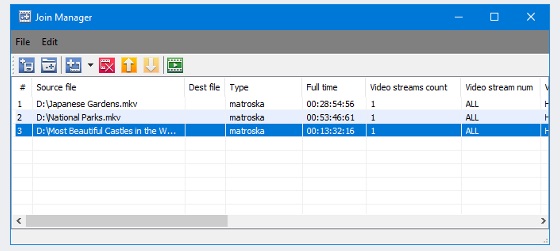
  • Added file joiner. Supported formats are AVI, WMA/WMV/ASF, MP3, MPEG-1 video
2.1.901.23, 2009-01-31
    Feature:
  • "Save All Segments" feature, that saves all the fragments on timeline to separate files
  • Added enumeration prefix to output file names. e.g input_0001.avi, input_0002.avi
  • Added "Add Task to Batch" item to Timeline context menu
    Fix:
  • Eating to big amount of memory and 99% hanging during big MPEG-2 files editing
  • Indexation of big MPEG-2 files sometime ended up with 99% progress hang
  • Crash during some AVIs with PCM audio trimming
  • Hang during attempt to open some other than XTL file as task list file (.xtl)
  • Command line util trimming results were unstable if edit big files > than 10 GB
  • Byte size now is showed in GB/MB/KB format instead of Bytes
2.1.901.13, 2009-01-13
    Fix:
  • Crash when trying to edit MPEG2 files via comand line batch utility.
2.1.810.30, 2008-10-30
    Fix:
  • Inaccurate editing of DVD VOB files. End positions of fragments set to be kept in output mismatched with set positions. Up to 10 frames in each fragment could be more than required
  • Fixed problem - if to open MPEG-2 with LPCM audio and try to edit that, the Splitter generated error - "Connecting additional trimmer pin with Muxer has been filed. hr = 0x80040207"
  • Video screen did not redraw while dragging or maximizing the main window
  • Fixed a crash arisen while trimming some AVI files with MP3 audio
  • Fixed navigation problem - when you navigate slider cursor between markers by TAB and then try to seek to one frame left/right, a current marker was navigated instead of a slider cursor
  • Fixed bug - when one tried to open SSP or XTL project with reference to index file(MLMIX) for MPEG-2 files > 4GB, splitter delivered message - "Source file is not supported or damaged"
  • Clip Scr file in SSP or XTL project showed incorrectly (e.g. if it was "C: empfile.vob" it showed "C: emp.file.vob")
  • If there was turned on - "Obey Sample Times" feature - obey_sample_times="1" flag was written twice to XTL or SSP that caused error in attempt to open such XTL or SSP file
  • LPCM audio in MPEG-2 wrong detection. The splitter showed Unknown audio type
  • Fixed a false alarm of possible File rewriting. If you opened some SSP, and changed an output file name then if it even did not exist the Splitter generated the warning
  • Fixed bug. If to open SSP file with set output file that can't be created and start processing, the Splitter fulfilled task but did not create an output. Now it generates an error
    Change:
  • To improve usability added *.SSP file filter on Open Media File dialog
  • Starting, "Time Calculator" now shows the difference between two nearest markers relatively the slide cursor position
  • If opening SSP file the Splitter does not find Clip Scar file (e.g. it was moved to other folder) it asks a user to specify it rather then error deliver
2.1.808.21, 2008-08-21
    Fix:
  • Fixed a bug with MPEG-2 files aspect ration changes. After MPEG-2 files
  • editing aspect ratio could be changed.
2.1.807.01, 2008-07-01
    Fix:
  • Black screens after editing MPEG-4 video (AVI,ASF,WMV) e.g. XVID with one visual object sequence per file. Now info added to first output frame.
  • There were thee digits instead of two in milliseconds time fields in timeline edit boxes. now format is HH:SS:MM:MS. MS is two most significant digits of milliseconds
  • Crash upon opening file project (.ssp)
  • Crash upon opening AVI file in the Splitter more than one time in Vista OS.
  • Milliseconds and seconds arrows did not operate correctly in timeline edit boxes
    Change:
  • For now one more error of WM/ASF Reader is handled inside of the Video Splitter. No need to set "Ignoring Trimming Errors" setting. (error- "Invalid or corrupt data was encountered". HRESULT: 0xc00d002f
2.1.806.10, 2008-06-10
    Fix:
  • Bug fixed. Audio distortion after trimming AVI with PCM audio
2.1.805.20, 2008-05-20
    Fixes:
  • System dlls, are no more placed to system32 directory. It should help to avoid OS reboot and some uninstallation problems.
2.1.804.20, 2008-04-20
    Features:
  • Added support of MPEG-2 files of High Defetition with frame accuracy
2.0.804.17, 2008-04-17
    Fixes:
  • Bug fixed. Audio distortion after trimming. Format MPEG-2 Layer-2
2.0.803.22, 2008-03-22
    Features:
  • Undo/Redo added
  • Seeking arrows to Slider and Markers edit boxes added
  • Shortcuts preferences added
    Changes:
  • Open and Save dialogs started to remember own file filder
    Fixes:
  • Fixed the bug . General protection error arised while editing some AVI files with MP3 audio.
2.0.802.03, 2008-02-03
    Fixes:
  • Fixed the bug . Cut out feature did not work, the splitter ignored all the fragments marked as "Cut Out".
  • Fixed the bug . The Splitter crashed during processing some WMV and ASF files.
  • Fixed the bug . The Splitter delivered an error "Error message: CDSPlayer::OStart" attempting to process the WMV or ASF files with video resolution height not multiple to 2.
  • Fixed the bug . If there were any pure markers, during audio files editing, output audio could be distorted at the markers positions.
  • Fixed the bug when while attempt to trim some AVI with MP3 audio the trimmer delivered an error - "The data is invalid. HRESULT: 0x8007000d. (Unspecified error hr= 0x80004005}"
  • Fixed memory leaks to occurre upon each trimming start/stop iteration
2.0.801.06, 2008-01-06
    Fixes:
  • Fixed bug. Opening Windows Media file (.asf, .wmv, .wma ) the splitter delivered "unknown exception" and then behaved incorrectly.
  • Fixed bug. Upon closing the Splitter after some trimming operations a generall error had been generated.
2.0.711.19, 2007-11-19
    Fixes:
  • Fixed bug when main window disapiared upon calling "Open Media File" menu item.
  • Fixed an installation warning "The version of the file being copied is older" about system dlls like mfc71.dll, mfc71u.dll etc.
2.0.711.09, 2007-11-09
    Fixes:
  • Fixed a problem arised during installation - "Cannot register "C:Program FilesCommon FilesSolveig MultimediaSMM_MP2TrimmerFA.ax" by adding mfc71u.dll to the installation.
  • Fixed trimming end of file problem.Not all the data was delivered to an output file.
2.0.711.1, 2007-11-01
    Features:
  • Supports MPEG-2 video files
  • Frame accuracy for MPEG-2 files
    Fixes:
  • Fixed the bug - SMM Video Splitter did not work with some DV AVI Type 2 files
1.2.705.05, 2007-05-05
    Features:
  • SolveigMM Videeo Splitter is shipped with command line version - SMM-BatchSplit
  • Added an ability to Save/Load current project
  • Added a feature to keep a window size after closing/opening
    Fixes:
  • Fixed the bug - if cancel window media file remuxing/indexing, "Runtime error, R6025, - pure virtual function call" and then general error arisen.
  • Fixed the bug - blocking an opened input file even after closing
  • Fixed the bug -"Ctrl+Left/Right Arrow"(next/previous frame) operated incorrect for DV AVI files
  • Fixed the bug - at cut points sometime video data froze
  • Fixed the bug - during remuxing/trimming small data loss occurred
  • Some more major and minor bugs were fixed
1.2.701.25, 2007-01-25
    Features:
  • Added support of MPEG1,2 Layers 1,2,3 (mp3,mpa,mp1, etc) audio files editing
  • Added support of Windows Media Audio (wma, asf, etc) audio files editing
  • Added "Size" feature for MPEG audio files. Now it can be used for AVI, MP3, MPA,MP1 files
    Changes:
  • Some controls were changed for usability improving
  • Delete markers button image was changed
  • For "Cut off/Keep On selected fragment " operations were made two buttons with images of Thumb Down and Thumb Up correspondingly
  • "Navigation" and "Zoom" menus were made as separate ones
  • "Select Next Marker", "Select Previous Marker" commands now moves slider cursor to next/previous markers
  • For now, if you try to re-write output file you get the message "Warning! The file already exists Do you want to replace it?" instead of the old "Warning. The file will be overwritten. Would you like to change destination file name". So, now if DO NOT want to rewrite already existing file you must answer NO.
  • For now, two errors of WM/ASF Reader are handled inside of the Video Splitter. That means for these error it is no need to set "Ignoring Trimming Errors" setting. (errors: 1.-"The buffer is not big enough. HRESULT: 0x8004020d (Unspecified error hr= 0x80004005)"; 2. - "Catastrophic Failure HRESULT: 0x8000FFFF (Unspecified error hr = 0x80004005)")
    Fixes:
  • Problem with the installed Haali Media Slpitter (KLite Codec Pack) with AVI support was fixed. Previous version returned "Input file has not been set properly or damaged (The parameter is incorrect. hr = 0x80070057)" Error if Haali was installed
  • The following error was fixed "Trimmer Start/Stop time list have not been set or incorrect. hr = 0x80070057". It arisen when two markers were set to the same position
  • Added WMSP1 ("Windows Media Audio 9 Voice") audio stream recognition
  • Added MSS2 ("Windows Media Video 9 Screen") video stream recognition
  • In some cases context "Save Selected Fragment As" did not operate. Fixed.
  • Some buttons graphical artifacts were fixed.
  • Batch manager "Open Dialog" file extension filter did not operate. Fixed.
1.2.610.08, 2006-10-08
    Fixes:
  • Bug with 100% CPU after pressing next K Frame was fixed
  • Some kind of MPEG-1 and OGG audio wrong recognizing was fxed
  • "Update task" operation wrong behaveour was fxed
  • Problem when only one task of a batch list is performed if tasks were added by means of drug and drop was fixed.
    Features:
  • Keeping AVI metadata to start with 'ATTR' FOURCC code that is used by Beyond TV software.
    Changes:
  • Installer was changed that has to help to avoid some of COM components not to be registered.
1.2.609.06, 2006-09-06
    Fixes:
  • Many major and minor bugs were fixed
    Features:
  • Full drag and drop feature was implemented (including batch editor)
  • For now it is possible to start processing of selected items in batch editor
  • For now when you resize the Splitter window, video is resized in accordance with initial proportions
  • Some more small features were implemented
1.2.607.31, 2006-07-31
    Fixes:
  • The bug with HD WMW Video was fixed. Video Splitter was unable to trim some HD WMW files because of out of memory
    Features:
  • Zooming timeline slider In / Out feature was implemented.
  • "Jump to 2 min backward / forward" hotkeys (SHIFT+Left / Right Arrow) were added
    Changes:
  • Navigation Commands were placed to Edit->Navigation submenu
  • Zoom Commands were placed to Edit->Zoom submenu
1.2.607.15, 2006-07-15
    Fixes:
  • The bug with Unicode file names e.g. with Chinese or Japanese symbols was fixed. Video Splitter was unable to open/same such files.
  • The bug with opening/playing WMV files by Windows Media Player was fixed. After opening, WMP didn’t start playing of WMV files produced by Video Splitter.
  • The ASF files produced by Beholder TV Tuner was fixed. Video Splitter was unable to edit ASF files (DivX + PCM) captured within Beholder TV Tuner.
  • Some more bugs with WMV video/audio trimming precise were fixed
    Features:
  • Some Menu, Context Menu and Batch Manager changes were made for GUI simplification.
  • "Menu->Output File Name.." was changed to "Save Media File As..". This menu point sets out file name and either starts trimming or add task to batch queue.
  • "Context Menu->Save Selected Fragment As..." point was added. This point operates like "Menu->Output File Name.." but with one fragment only.
  • "Invert Time Line Fragments" command automatically adds additional markers if it is necessary.
  • For now you can switch off "Markers K Frame Positioning" and "Slider K Frame Positioning"
  • "Ignoring Trimming Errors" feature was added. (It's used when WM/ASF Reader delivers error "the buffer is not big enough").
  • All the features including Task List (batch) file format is documented
1.2.606.15, 2006-06-15
    Fixes:
  • The bug with WMV navigating was fixed (with some WMV files a navigation din not operate)
1.2.606.13, 2006-06-13
    Features:
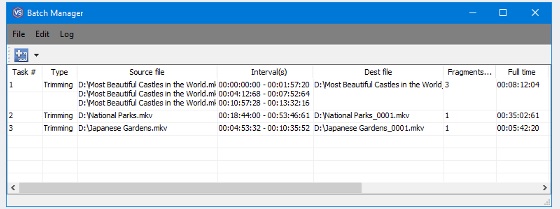
  • Batch files processing (trimming, saving/opening list file)
  • Audio stream choosing ability was added (before, the first audio stream was trimmed )
    Fixes:
  • The bug with WMV last frame was fixed (often last video frame of WMV was not rendered)
  • The bug with WMA inaccuracy was fixed
  • Some trimming bugs concerning inaccuracy and video artifacts were fixed
    Restrictions:
  • Batch files processing is not documented for the present
1.1.612.20, 2006-12-20
    Features:
  • Supports WMV format
  • Supports ASF file format with any video (WMV 1,2,3, MPEG-4 AVC, DivX, etc) and audio (MPEG L. 1,2,3, AC3, WMAudio V 2,7,8, etc) content
  • AVI to ASF re-multiplexing (without re-encoding)
    Fixes:
  • The bug with AVI contained MPEG1 layer 2 audio has been fixed
  • The bug with Help calling has been fixed
    Changes:
  • SolveigMM ASF Multiplexer has been added to package
    Restrictions:
  • "Size" feature does not operate within WMV/ASF mode, and it is not documented for the present
  • WMV/ASF support is not documented for the present
    Note:
  • WMV/ASF supporting requires Windows Media Format 9 Series Runtime (to be shipped with Windows Media Player 9 and higher)
  • MS: http://www.microsoft.com/windows/windowsmedia/9series/player.aspx
  • Dptop Link: http://www.dptop.com/app/wmfdist9.exe (5 MB)
1.1.605.10, 2006-05-10
    Fixes:
  • The bug with one of AVI streams splitting has been fixed ( if AVI had only one stream: video or audio, or a user selected only one stream to be trimmed the Splitter didn’t operate )
  • The bug with audio only of WMV/ASF splitting has been fixed ( if a user selected audio stream to be trimmed the Splitter didn’t operate )
  • The bug with audio AVI to ASF conversation has been fixed ( if a user selected audio stream to be trimmed to ASF file the Splitter didn’t operate )
    Enhanced:
  • Positioning feature has been added. Now upon double-click to a marker, the slider jumps to a marker position
1.1.605.02, 2006-05-02
    Enhanced:
  • Buttons "Open file" and "Output File" have been added for usability to "Movie" and "Selection" sections
  • Feature to "Index" or "Remux with indexing" for unindexed or damaged ASF and WMV files has been added
  • Time Edit Boxes for markers and fragments are enabled to manual editing
  • "Copy/Paste" feature has been added to time edit boxes of slider and markers
  • Jumping to 1/20th of movie length forward and backward (Page Up, Page Down) and to a movie start/end positions (End, Home) has been added
    Fixes:
  • The bug with AVI damaging while trimming has been fixed (after trimming in lower part of video in some AVI files appeared artifacts)
  • The bug with a last frame in timeline has been fixed (neither markers nor slider were allowed to be set to last frame)
  • The bug with redrawing a video frame while dragging the Video Splitter in overlay mode has been fixed (now a frame is redrawn after dragging stops)
  • The bug with filters enumerating in "icon"->"info" dialog has been fixed
1.1.603.23, 2006-03-23
    Enhanced:
  • Formatting "Byte Size" value has been added for usability (e.g. old value sight 1461925888 and new one is 1 461 925 888 )
    Fixes:
  • The bug with hanging after trimming completes has been fixed
  • The bug with big DV files more than 7 minutes (slider time repeating) has been fixed
  • The bug with estimating output AVI file size ( getting size process was not started) has been fixed
  • The bug with trimming raw video AVI (e.g. RGB24 ) has been fixed
1.0.512.28, 2005-12-28
    Enhanced:
  • A feature of getting output AVI file size has been added
1.0.510.30, 2005-10-30
    Fixes:
  • The bug with messed control colors when Video Card bit depth is 24 or 8 bits has been fixed.
    Changes:
  • To avoid registration problems with COM components the following system DLLs have been added to installation: atl71.dll, msvcp71.dll, msvcr71.dll
1.0.509.24, 2005-09-24
    Enhanced:
  • An input AVI file Drug and Drop feature has been added
    Fixes:
  • K frame navigation has been improved
  • DV AVI type 1,2 preview has been added
  • The bug when an initial output file was overwritten during a second trimming operation has been fixed.
  • WYSIWYG feature ( i.e. precision ) has been improved
  • Some issues with out of sync on some kind of AVI files have been fixed
    Changes:
  • An ability to register the version has been added
  • An ability to view the filters info has been added
    Known problems:
  • Navigation problems with DivX decoders
1.0.508.12, 2005-08-12
    Features:
  • Based on a freeware SolveigMM AVI Trimmer Component
  • Supports any AVI file format (DV type 1 and 2, OpenDML) with any video (DivX, XviD, 3ivX, etc.) and audio (MPEG-1, MPEG-2 layer 3, AC3, etc.) content.
  • Supports large AVI files (more than 2GB)
  • Allows trimming AVI files contained VBR audio without synchronization loss
  • Advanced K frame navigation
  • K frame accuracy
  • WYSIWYG preview
  • Allows multiple fragment processing in single pass
www.solveigmm.com | Site map | Privacy Policy | Terms of Use
Copyright 2004-2012 © Solveig Multimedia
All rights reserved