Eng
Eng  Rus
Rus  Deu
Deu  Ital
Ital  Esp
Esp  Port
Port  Jap
Jap  Chin
Chin Video Splitter 5 Offers Better Trimming of Videos with Subtitles and Multiple Audio Streams
For Immediate Release
Video Splitter 5 Offers Better Trimming of Videos with Subtitles and Multiple Audio Streams
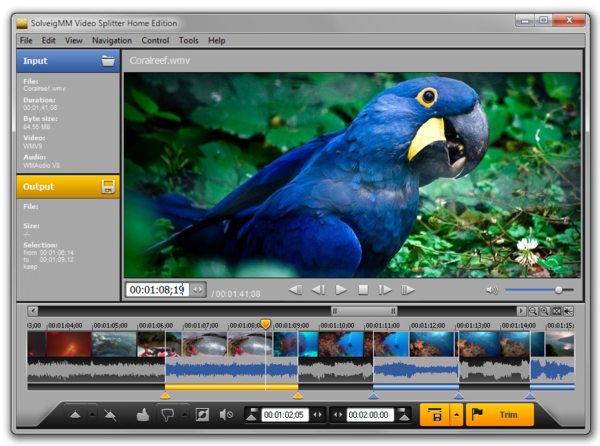
March 17, 2015, Tomsk, Russia - Solveig Multimedia announces SolveigMM Video Splitter 5 - an update of the definitive tool for editing multimedia files without the loss of quality. The new release supports embedded and standalone subtitles, multiple audio streams with a convenient dialog, enhanced marker workflow, and a number of UI improvements.
SolveigMM Video Splitter stands out from the competitive video trimming solutions thanks to frame-precise editing, smart video trimming and other expert functions enveloped into a user-friendly interface. And by releasing the fifth version of the editor, Solveig Multimedia is consolidating the advantage.
Video Splitter 5 is a real step forward towards even better ease of use. Firstly, it finally provides a full-featured support for embedded (MKV, WEBM and AVI formats) and standalone (MKV, WEBM, MP4, AVI) subtitles in video files. The program supports trimming and joining of videos with multiple subtitle streams in the most popular subtitle formats - SRT, ASS, GAB2, SSA, UTF8. Now, a user doesn´t have to edit the video itself and subtitle files individually. Video Splitter makes this process much more natural.
The same is true for audio streams in MKV, WEBM, MP4 and AVI formats, and that´s the second novelty. Many video files have multiple audio tracks in them, and effortless splitting and trimming is particularly important in these cases. When using Video Splitter 5, a user simply edits the file as usual, and the program takes care of all respective audio tracks. Conveniently, there is a handy dialog available in the program for selecting streams for preview and editing.
The new version also introduces a number of UI improvements making the work with the editor even faster and easier than before. In particular, the new intelligent modes "Add Marker + Invert Fragment" and "Cut Out Previous Fragment" have joined the marker workflow to significantly speed up selecting and cutting out unnecessary fragments.
Pricing and availability
Video Splitter is available for Windows XP/2000/2003/Vista/7/8 and requires DirectX 8.0 or higher as well as appropriate video codecs and runtimes installed. The price of SolveigMM Video Splitter Home Edition is $49.95, while the Business Edition costs $200. The company also offers portable versions of the software for $79.95 and $200 respectively. Unlike the Home Edition, the Business Edition includes batch processing and command line support.
Links
Website: https://www.solveigmm.com
Product page: https://www.solveigmm.com/en/products/video-splitter/
About
Solveig Multimedia develops tools for the most complex video editing tasks in such areas as digital video broadcasting, surveillance, video content censoring, surgical imaging and others. The company operates on the market since 2003 and its products and SDK are well known both among home users and video editing professionals.
Contacts
Olga Krovyakova
Solveig Multimedia
PR Manager
pr@solveigmm.com