Eng
Eng  Rus
Rus  Deu
Deu  Ital
Ital  Esp
Esp  Port
Port  Jap
Jap  Chin
Chin Fast and Lossless AVC Video Editing Tool for Everybody
For immediate release
19 January 2012
Fast and Lossless AVC Video Editing Tool for Everybody
Solveig Multimedia has announced the release of Video Splitter 3.0, a new version of its fast and lossless AVC/H264 video editor. Version 3.0 offers a number of improvements and new features: more supported formats, scalable visual timeline with frame mode, enhanced interface and more. Video Splitter is officially compatible with Windows 7.
Solveig MM Video Splitter is a powerful video editor that offers professional quality at an affordable price. It enables the user to splice and cut out video fragments without encoding/decoding – thus the original quality is preserved, and editing takes as little time as possible. No wonder that the solution has won significant popularity as a fast and handy tool for creation of presentations, videos for Facebook or YouTube, removal of ads and inappropriate scenes.
As for the new version of Video Splitter, it boasts a good number of significant improvements. For example, the range of supported formats has been extended: it now includes AVCHD, MP4, MOV, and MKV (in addition to MPEG-2, MPEG-1, AVI, WMV, ASF, MP3 and WMA files). Video fragments in the newly added formats can be clipped with one-frame accuracy as well as seamlessly joined up.
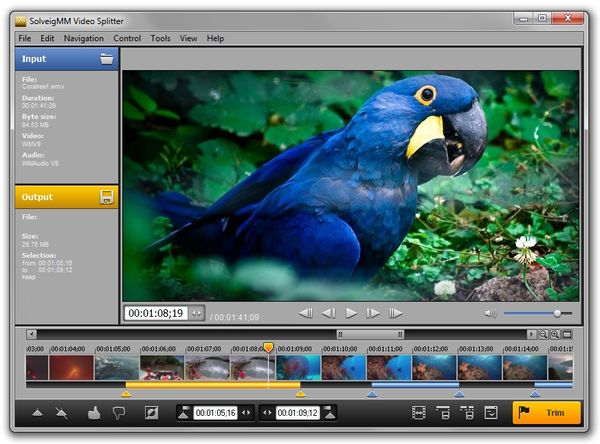
Another new feature that enables the user to perform more precise editing is the visual timeline with support for frame-by-frame mode. If necessary, the user can manually scale it by moving a special slider. Besides, Video Splitter 3.0 allows setting markers within one frame, which is especially convenient if the user needs to edit long frames.
The interface of Video Splitter 3.0 has also been enhanced, so that every user could experience really smooth and intuitive interaction with the solution. The free evaluation version is available for downloading at the product page.
Video Splitter 3.0 at a Glance:
- Supports MPEG-2 files (.MPG, .MPEG, .VOB, .TS );
- Supports AVI files (.AVI), including files exceeding 2 and 4 GB;
- Supports MPEG audio files ( .mp1, .mp2, .mp3, .mpa);
- Supports Windows media files (.asf, .wma, .wmv, .wm);
- Supports AVCHD, MP4, MOV, and MKV;
- Encoding/decoding is not involved, and the original quality is preserved;
- Seamlessly splices video fragments in different formats without conversion;
- Supports batch mode editing;
- Multilingual user-friendly interface;
- Officially compatible with Windows 7.
Pricing and Availability
Video Splitter 3.0 is compatible with Windows XP, 2000, 2003, Vista, or 7. A single-user license costs 39.95 Euro plus VAT. Further information is available at the product page.
Links:
Download link: https://www.solveigmm.com/download/SolveigMM_Video_Splitter.exe
Follow us on Twitter: https://twitter.com/SolveigMM
Join us on Facebook: https://www.facebook.com/pages/Solveig-Multimedia/107167942688451
Company
Founded in 2003, Solveig Multimedia (SolveigMM) is a research and development company specializing in complex video editing programs made for both home users and professionals. The company’s products and SDKs support cutting-edge video standards and formats. Walt Disney, Canon, British Airways, Greenpeace and other well-known corporations have selected SolveigMM products as their video editing tools.
Contacts:
Olga Krovyakova
Solveig Multimedia
PR Manager
E-mail: pr@solveigmm.com